Computer Networks is a high-weightage topic in the IBPS SO IT Officer Professional Knowledge paper, testing the OSI Model, TCP/IP Model, IP Addressing, Network Devices, Routing, Switching, TCP vs UDP, and common protocols with their port numbers. Most questions are conceptual and comparison-based (e.g., Hub vs Switch, TCP vs UDP) rather than numerical, which makes structured revision more effective than solving random questions.
This guide is a single-page revision hub: concise notes, comparison tables, and a priority order for what to study first, followed by topic-wise and full-length mock tests.
Topic Priority for Revision
Previous year papers show a consistent pattern in which topics get tested most. Use this single table to sequence your revision — no need to revisit priority elsewhere in this guide.
| Topic | Exam Weightage | Revise |
|---|---|---|
| OSI Model | ⭐⭐⭐⭐⭐ | First |
| TCP/IP Model | ⭐⭐⭐⭐⭐ | First |
| Network Devices | ⭐⭐⭐⭐⭐ | First |
| IP Addressing (IPv4 & IPv6) | ⭐⭐⭐⭐⭐ | First |
| Network Protocols & Port Numbers | ⭐⭐⭐⭐⭐ | First |
| TCP vs UDP | ⭐⭐⭐⭐⭐ | First |
| Routing | ⭐⭐⭐⭐☆ | Second |
| Switching Techniques | ⭐⭐⭐⭐☆ | Second |
| Subnetting | ⭐⭐⭐⭐☆ | Second |
| Network Topologies | ⭐⭐⭐☆☆ | Third |
| Transmission Media | ⭐⭐⭐☆☆ | Third |
| Network Security Basics (Firewall/VPN/IDS-IPS) | ⭐⭐⭐☆☆ | Third |
Exam-day shortage of time? Cover every "First" row above, then TCP vs UDP and port numbers — together these account for the majority of Computer Networks questions in past IBPS SO IT Officer papers.
1. Computer Network Fundamentals
A Computer Network is a collection of two or more devices connected through wired or wireless channels to exchange data and share resources using standard protocols.
Essential Terms
| Term | Definition |
|---|---|
| Node | Any device connected to a network (computer, printer, router). |
| Host | A node with its own IP address that can send and receive data. |
| Protocol | A set of rules governing communication between devices. |
| Bandwidth | Maximum data that can be transmitted per second (capacity). |
| Throughput | Actual data successfully transmitted (real-world result). |
| Latency | Time taken for a packet to travel from source to destination (delay). |
| Packet | A small unit of data transmitted across a network. |
Q: What is the difference between Bandwidth and Throughput? A: Bandwidth is the maximum theoretical transmission capacity of a channel; Throughput is the actual amount of data successfully delivered, which is usually lower due to congestion, errors, or overhead.
Quick Revision
- A network connects devices for communication and resource sharing using protocols.
- Data travels as packets.
- Every host is a node, but not every node is a host.
- Bandwidth = capacity; Throughput = actual delivery; Latency = delay.
Start Your Computer Networks Revision
Revise the topics above, then reinforce them with an AI-generated topic-wise mock test built for the IBPS SO IT Officer exam.
2. Types of Networks & Topologies
Networks by Coverage Area
| Network Type | Full Form | Coverage Area | Example |
|---|---|---|---|
| PAN | Personal Area Network | Up to ~10 meters | Bluetooth, Smartwatch |
| LAN | Local Area Network | Home, Office, Building | Office Network |
| CAN | Campus Area Network | University/Org Campus | College Network |
| MAN | Metropolitan Area Network | A City | City-wide ISP Network |
| WAN | Wide Area Network | Country / Worldwide | The Internet |
Q: Which network type has the largest coverage area? A: WAN (Wide Area Network) covers the largest area; the Internet is the largest example of a WAN. Coverage increases in the order PAN → LAN → CAN → MAN → WAN.
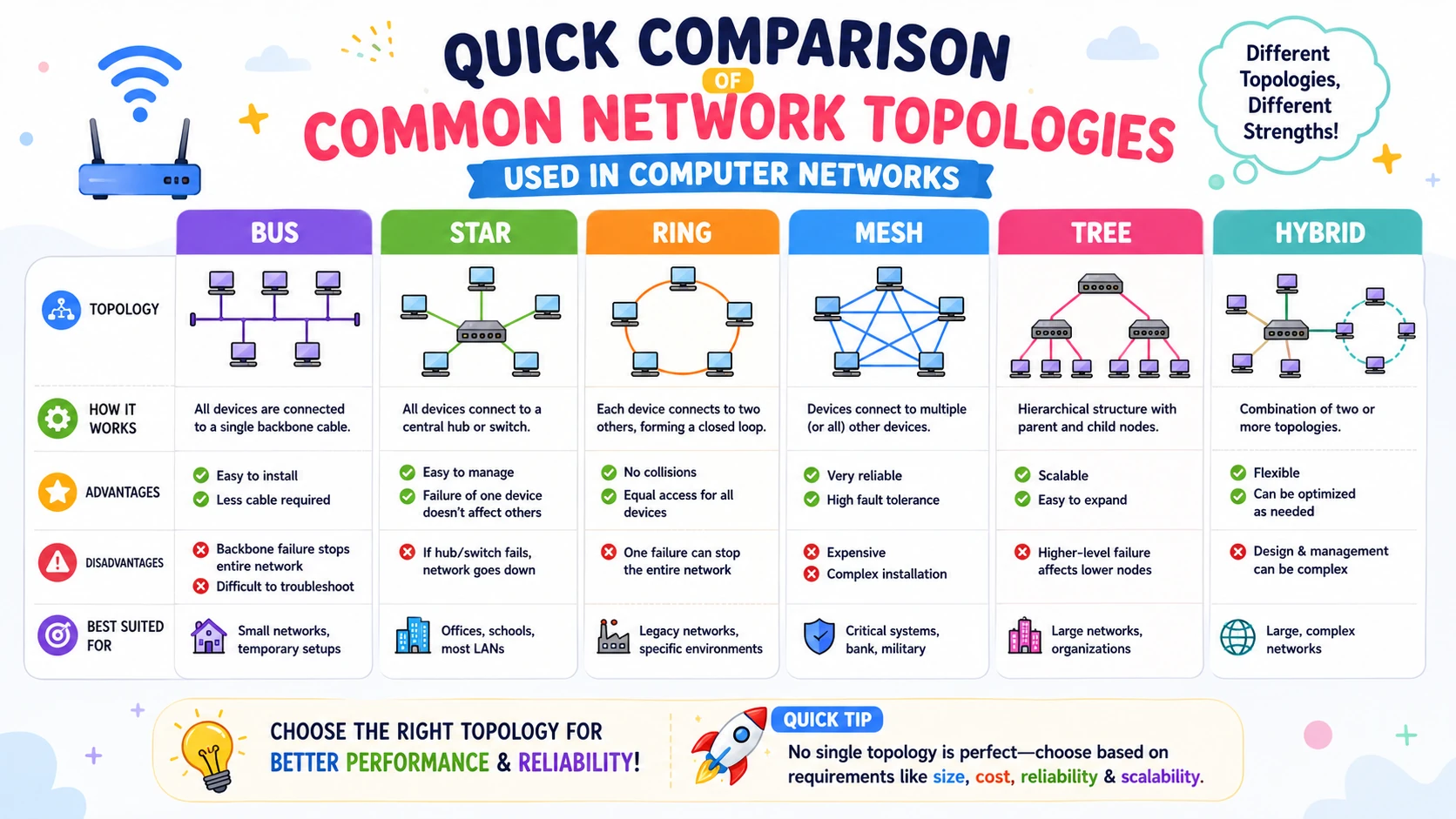
Network Topologies
| Topology | Key Feature | Advantage | Limitation |
|---|---|---|---|
| Bus | Single shared backbone cable | Low cost | Backbone failure disrupts entire network |
| Star | All devices linked to a central hub/switch | Easy to manage & troubleshoot | Central device failure disconnects all |
| Ring | Devices connected in a closed loop | Predictable, orderly data flow | One node's failure can disrupt the ring |
| Mesh | Every device connected to multiple devices | Highest reliability | Expensive, complex cabling |
| Tree | Combination of Star and Bus | Highly scalable | Depends on the backbone |
Quick Revision
- Coverage order: PAN < LAN < CAN < MAN < WAN.
- Star is the most common LAN topology today; Mesh is the most fault-tolerant but costliest.
- Physical topology = actual device layout; Logical topology = how data actually flows.
3. OSI Model
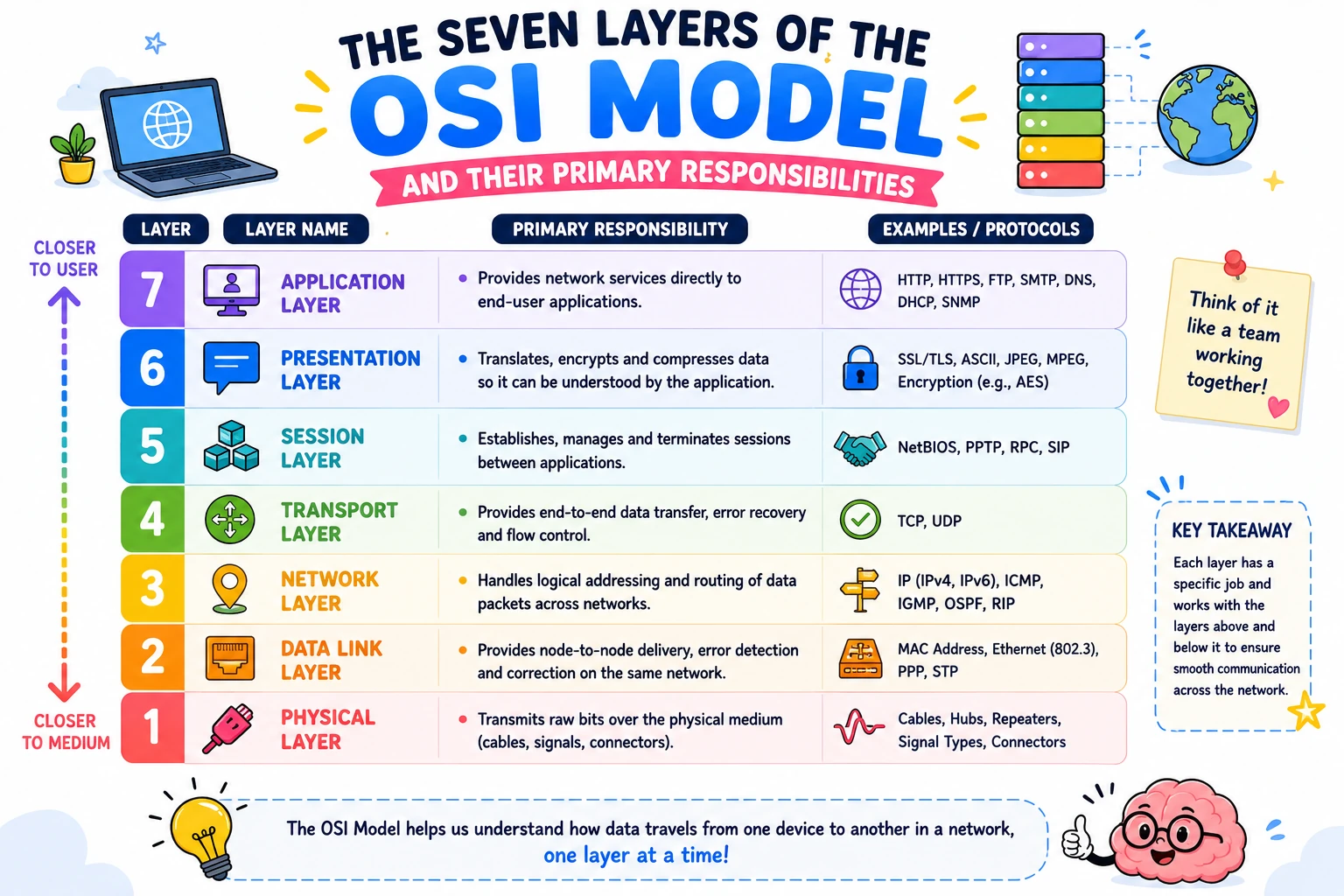
The OSI (Open Systems Interconnection) Model is a 7-layer conceptual framework, developed by ISO, that standardizes how data travels from one device to another across a network.
| Layer No. | Layer | Function | Protocols / Devices |
|---|---|---|---|
| 7 | Application | Interface for end-user network services | HTTP, HTTPS, FTP, SMTP, DNS |
| 6 | Presentation | Translation, encryption, compression | SSL/TLS, JPEG, ASCII |
| 5 | Session | Establishes, manages, terminates sessions | NetBIOS, RPC |
| 4 | Transport | End-to-end delivery, reliability, flow control | TCP, UDP |
| 3 | Network | Logical (IP) addressing and routing | IP, ICMP, Router |
| 2 | Data Link | Framing, MAC addressing, error detection | Ethernet, Switch, Bridge |
| 1 | Physical | Transmission of raw bits over the medium | Hub, Repeater, Cables |
Mnemonic (Layer 7 → 1): All People Seem To Need Data Processing Mnemonic (Layer 1 → 7): Please Do Not Throw Sausage Pizza Away
Q: Which OSI layer does a Router operate at? A: A Router operates at Layer 3, the Network Layer, using IP addresses for routing decisions.
Q: Which OSI layer does a Switch operate at? A: A Switch operates at Layer 2, the Data Link Layer, forwarding frames using MAC addresses.
Quick Revision
- OSI has 7 layers; Physical Layer transmits raw bits, Application Layer talks to end-user software.
- Data Link Layer → MAC address; Network Layer → IP address & routing.
- Router → Layer 3, Switch/Bridge → Layer 2, Hub/Repeater → Layer 1.
- Learn at least one protocol per layer (see table above).
4. TCP/IP Model
The TCP/IP Model is the practical 4-layer networking model that the Internet actually runs on, in contrast to the conceptual 7-layer OSI Model.
| TCP/IP Layer | Function | Protocols |
|---|---|---|
| Application | Network services for end-user applications | HTTP, HTTPS, FTP, SMTP, DNS, DHCP, SNMP |
| Transport | End-to-end communication, reliability, flow control | TCP, UDP |
| Internet | Logical addressing and routing | IP, ICMP, ARP |
| Network Access | Data transmission over the physical network | Ethernet, Wi-Fi, PPP |
OSI ↔ TCP/IP Mapping
| OSI Layer | TCP/IP Layer |
|---|---|
| Application, Presentation, Session | Application |
| Transport | Transport |
| Network | Internet |
| Data Link, Physical | Network Access |
Q: Why does the TCP/IP Model have only 4 layers instead of OSI's 7? A: TCP/IP merges OSI's Application, Presentation, and Session layers into a single Application layer, and merges the Data Link and Physical layers into a single Network Access layer.
Quick Revision
- TCP/IP = 4 layers: Application, Transport, Internet, Network Access.
- Internet Layer performs routing via IP; this maps to OSI's Network Layer.
- The Internet runs on TCP/IP, not OSI, which is why TCP/IP vs OSI is a favorite comparison question.
5. Network Devices
Network devices are hardware components — Hub, Switch, Router, Bridge, Gateway, Repeater, Modem, and Firewall — that connect devices and forward data across a network, each operating at a specific OSI layer.
| Device | Function | OSI Layer |
|---|---|---|
| Hub | Broadcasts incoming data to all connected devices | Physical (1) |
| Repeater | Regenerates weak signals to extend distance | Physical (1) |
| Bridge | Filters traffic between LAN segments using MAC addresses | Data Link (2) |
| Switch | Forwards frames only to the intended device via MAC address | Data Link (2) |
| Router | Forwards packets between networks using IP addresses | Network (3) |
| Gateway | Connects networks using different protocols | Multiple (typically Application) |
| Modem | Converts digital signals to analog and back | Physical (1) |
| Firewall | Filters incoming/outgoing traffic for security | Network / Application |
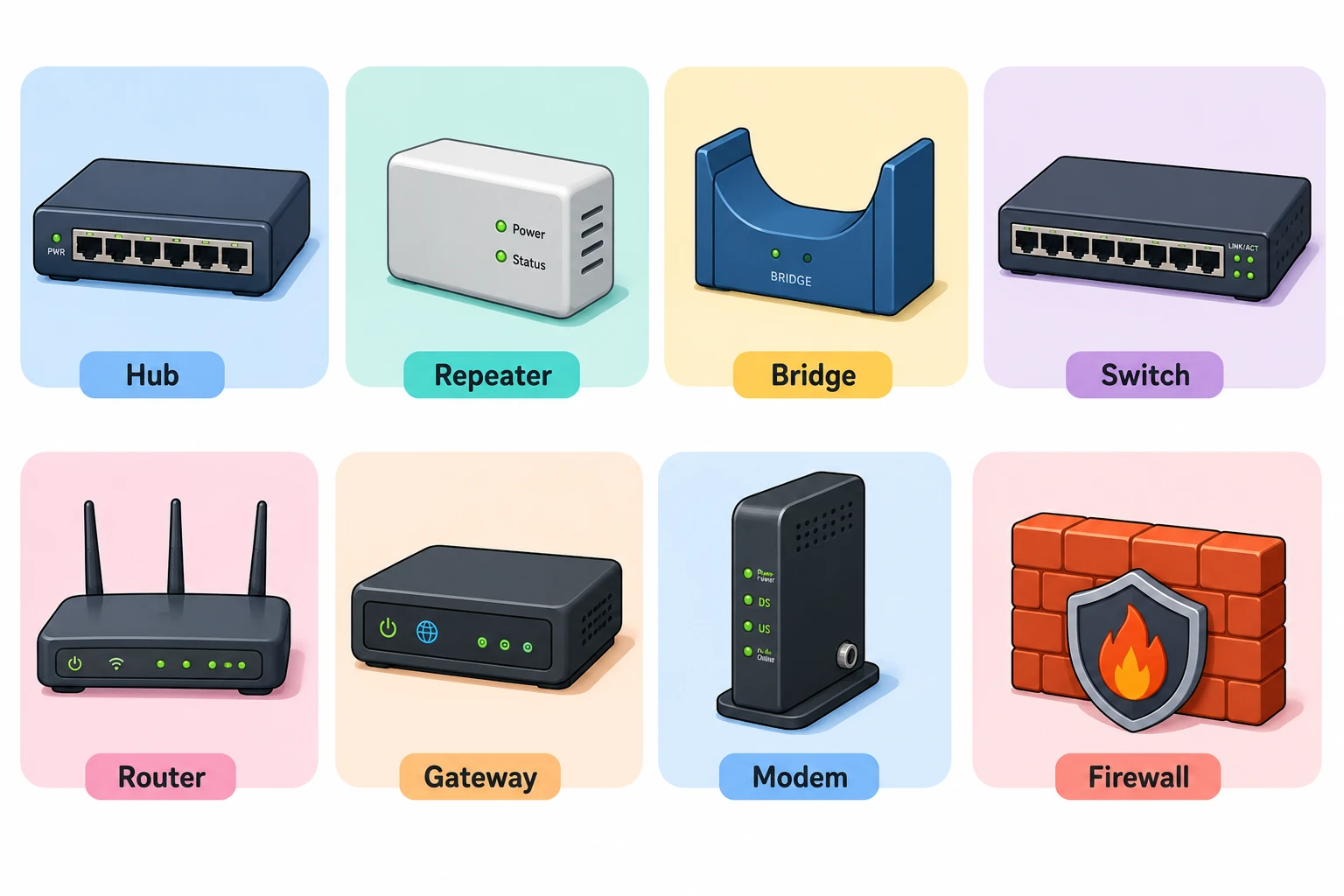
Q: What is the difference between a Hub and a Switch? A: A Hub broadcasts incoming data to every connected device with no intelligence, while a Switch reads MAC addresses and forwards data only to the intended recipient, making it faster and more secure.
Q: What is the difference between a Switch and a Router? A: A Switch connects devices within the same LAN using MAC addresses (Layer 2); a Router connects different networks using IP addresses (Layer 3).
Quick Revision
- Hub → broadcasts; Switch → MAC-based forwarding; Router → IP-based forwarding.
- Bridge = LAN segmentation; Repeater = signal regeneration; Modem = digital↔analog conversion.
- Gateway = protocol converter between different network types.
6. Transmission Media
Transmission media is the physical or wireless channel that carries data between devices, classified as Guided (wired) or Unguided (wireless).
| Medium | Type | Key Feature | Common Use |
|---|---|---|---|
| Twisted Pair Cable | Guided | Low cost, easy install, noise-prone | Ethernet LANs, telephone lines |
| Coaxial Cable | Guided | Better shielding & bandwidth than twisted pair | Cable TV, broadband |
| Optical Fiber | Guided | Highest bandwidth, immune to EM interference | Internet backbone, data centers |
| Radio Waves | Unguided | Omnidirectional, long range | Wi-Fi, mobile networks |
| Microwaves | Unguided | Requires line-of-sight, high bandwidth | Satellite, cellular networks |
| Infrared | Unguided | Short range, blocked by walls | TV remotes |
| Satellite | Unguided | Very large geographical coverage | GPS, broadcasting |
Q: Which transmission medium offers the highest bandwidth and is immune to electromagnetic interference? A: Optical Fiber — it offers the highest bandwidth, longest transmission distance, and immunity to electromagnetic interference among common transmission media.
Quick Revision
- Guided = physical cable; Unguided = electromagnetic waves through air.
- Optical Fiber wins on bandwidth, distance, and EMI immunity.
- Microwave communication needs line-of-sight; Infrared is strictly short-range.
7. Switching Techniques
Switching is how data moves from source to destination through intermediate nodes; the three types are Circuit Switching, Packet Switching, and Message Switching.
| Technique | Connection Needed | Data Unit | Delay | Example |
|---|---|---|---|---|
| Circuit Switching | Yes | Continuous stream | Low after setup | Traditional telephone network |
| Packet Switching | No | Packets | Variable | Internet |
| Message Switching | No | Complete message | High | Telegraph (historical) |
Q: Which switching technique does the Internet use? A: The Internet uses Packet Switching. Data is broken into packets that may travel independent routes and are reassembled at the destination, making bandwidth usage efficient.
Q: What is Store-and-Forward switching? A: Store-and-Forward is the mechanism used in Message Switching, where the entire message is received and stored at each intermediate node before being forwarded to the next node.
Quick Revision
- Circuit Switching → dedicated path, connection-oriented (telephone networks).
- Packet Switching → efficient, scalable, powers the Internet.
- Message Switching → store-and-forward, high delay, largely obsolete.
8. IP Addressing
An IP Address is a unique logical address assigned to every device on a network, enabling devices to identify and communicate with each other.
IPv4 vs IPv6
| Feature | IPv4 | IPv6 |
|---|---|---|
| Address Length | 32 bits | 128 bits |
| Format | Decimal (192.168.1.1) | Hexadecimal (2001:db8::1) |
| Total Addresses | ~4.3 billion | Virtually unlimited (2¹²⁸) |
| Security | Optional (IPSec) | Built-in IPSec support |
| NAT | Typically required | Generally not required |
IPv4 Classes & Private Ranges
| Class | Public Range | Default Mask | Private Range (if any) |
|---|---|---|---|
| A | 1.0.0.0 – 126.255.255.255 | 255.0.0.0 | 10.0.0.0 – 10.255.255.255 |
| B | 128.0.0.0 – 191.255.255.255 | 255.255.0.0 | 172.16.0.0 – 172.31.255.255 |
| C | 192.0.0.0 – 223.255.255.255 | 255.255.255.0 | 192.168.0.0 – 192.168.255.255 |
| D | 224.0.0.0 – 239.255.255.255 | N/A (Multicast) | — |
| E | 240.0.0.0 – 255.255.255.255 | N/A (Experimental) | — |
Special addresses: 127.0.0.1 = loopback · 0.0.0.0 = unspecified · 255.255.255.255 = limited broadcast · 169.254.0.0/16 = APIPA.
Q: What is the difference between a Public IP and a Private IP? A: A Public IP is globally unique and assigned by an ISP for direct Internet communication; a Private IP is used only within a local network and is not directly reachable from the Internet.
Q: What is the purpose of 127.0.0.1? A: 127.0.0.1 is the loopback address, used by a device to refer to itself (localhost) for testing network software without using a physical network interface.
Quick Revision
- IPv4 = 32-bit; IPv6 = 128-bit.
- Class D = Multicast; Class E = Experimental.
- Private ranges: 10.x (A), 172.16–172.31.x (B), 192.168.x (C).
- IP Address = logical address; MAC Address = physical address.
9. Subnetting
Subnetting divides a large network into smaller subnetworks using a subnet mask to separate the Network ID from the Host ID, improving address utilization and security.
| CIDR | Subnet Mask | Host Bits |
|---|---|---|
| /8 | 255.0.0.0 | 24 |
| /16 | 255.255.0.0 | 16 |
| /24 | 255.255.255.0 | 8 |
| /30 | 255.255.255.252 | 2 |
Q: What does a larger CIDR prefix (e.g., /30) mean for host addresses? A: A larger CIDR prefix means fewer host bits and therefore fewer usable host addresses; a smaller prefix (e.g., /16) leaves more host bits and more usable addresses.
Quick Revision
- Subnet Mask separates Network ID from Host ID.
- CIDR (e.g.,
/24) replaced traditional classful addressing. /24 = 255.255.255.0is the most commonly tested subnet mask.
10. Routing
Routing is the process by which a Router selects the best path to forward packets from a source network to a destination network, using routing tables and routing protocols.
| Protocol | Type | Algorithm | Key Fact |
|---|---|---|---|
| RIP | Distance Vector | Bellman-Ford | Max hop count = 15 |
| OSPF | Link State | Dijkstra | Faster convergence than RIP |
| BGP | Path Vector | Path Selection | Routes between Autonomous Systems (used on the Internet) |
| EIGRP | Hybrid | DUAL | Cisco-proprietary |
Q: Which routing protocol uses the Dijkstra algorithm? A: OSPF (Open Shortest Path First) uses the Dijkstra algorithm to calculate the shortest path, and it is a Link State protocol.
Q: Which routing protocol is used for routing on the Internet? A: BGP (Border Gateway Protocol) is the standard protocol for routing between Autonomous Systems and is the core routing protocol of the Internet.
Quick Revision
- Static Routing = manual; Dynamic Routing = automatic via protocols.
- RIP → Distance Vector, hop count (max 15).
- OSPF → Link State, Dijkstra algorithm.
- BGP → inter-network/Internet routing.
11. TCP vs UDP
TCP and UDP are the two Transport Layer protocols: TCP is connection-oriented and reliable, while UDP is connectionless and faster but unreliable.
| Feature | TCP | UDP |
|---|---|---|
| Connection | Connection-oriented | Connectionless |
| Reliability | Reliable, guaranteed delivery | Best-effort, unreliable |
| Flow/Congestion Control | Yes | No |
| Header Size | 20–60 bytes | 8 bytes |
| Speed | Slower | Faster |
| Common Uses | HTTP/HTTPS, FTP, SMTP, SSH | DNS, DHCP, VoIP, gaming, streaming |
Q: Which protocol should be used when reliability matters more than speed? A: TCP, because it guarantees ordered, error-checked, and acknowledged delivery via flow and congestion control.
Q: Which protocol is preferred for real-time applications like video calls or gaming? A: UDP, because it has minimal overhead and lower latency, tolerating occasional data loss in exchange for speed.
Quick Revision
- TCP = reliable, connection-oriented, slower.
- UDP = fast, connectionless, best-effort.
- If the question says "reliability" → TCP; if it says "speed/real-time" → UDP.
12. Important Network Protocols & Port Numbers
A network protocol is a set of rules governing device communication; competitive exams frequently test each protocol's default port number and transport layer (TCP or UDP).
| Protocol | Port | Transport | Purpose |
|---|---|---|---|
| HTTP | 80 | TCP | Web communication |
| HTTPS | 443 | TCP | Secure web communication |
| FTP | 21 | TCP | File transfer |
| SSH | 22 | TCP | Secure remote login |
| Telnet | 23 | TCP | Remote login (insecure) |
| SMTP | 25 | TCP | Sending emails |
| DNS | 53 | UDP/TCP | Domain name resolution |
| DHCP | 67, 68 | UDP | Automatic IP allocation |
| TFTP | 69 | UDP | Simple file transfer |
| POP3 | 110 | TCP | Receiving emails |
| IMAP | 143 | TCP | Email synchronization |
| SNMP | 161 | UDP | Network monitoring |
Port assignments follow the IANA Service Name and Transport Protocol Port Number Registry.
Q: Which protocol uses port 443? A: HTTPS uses port 443 for secure, encrypted web communication over TCP.
Quick Revision
- HTTP (80) / HTTPS (443) — web; FTP (21) — file transfer; SSH (22) — secure login.
- SMTP (25) sends mail; POP3 (110) and IMAP (143) receive mail.
- DNS (53) and DHCP (67/68) primarily use UDP.
13. Network Security Basics
Network security protects data and infrastructure from unauthorized access using tools such as Firewalls, VPNs, SSL/TLS, and Intrusion Detection/Prevention Systems.
| Technology | Purpose |
|---|---|
| Firewall | Filters incoming/outgoing network traffic |
| VPN | Creates an encrypted tunnel over a public network |
| SSL/TLS | Encrypts client-server communication |
| IDS | Detects suspicious network activity |
| IPS | Detects and automatically blocks malicious traffic |
| Antivirus | Detects and removes malware |
Q: What is the difference between IDS and IPS? A: An IDS (Intrusion Detection System) only detects and alerts on suspicious activity, while an IPS (Intrusion Prevention System) detects and automatically blocks the malicious traffic.
Quick Revision
- Firewall = traffic filter; VPN = encrypted tunnel; SSL/TLS = encryption.
- IDS = detection only; IPS = detection + prevention.
Quick Revision Cheat Sheet
One final scan before your mock test.
| Concept | Remember |
|---|---|
| OSI Layers | 7 (Physical → Application) |
| TCP/IP Layers | 4 (Network Access → Application) |
| MAC Address | Physical address |
| IP Address | Logical address |
| Switch | Uses MAC address, Layer 2 |
| Router | Uses IP address, Layer 3 |
| IPv4 / IPv6 | 32-bit / 128-bit |
| TCP / UDP | Reliable / Fast |
| Internet's switching | Packet Switching |
| Internet's routing | BGP |
| HTTP / HTTPS port | 80 / 443 |
Frequently Asked Questions
Is Computer Networks important for the IBPS SO IT Officer exam? Yes. Computer Networks is one of the highest-weightage technical subjects in the Professional Knowledge section, and questions from it appear almost every year.
Which Computer Networks topics are most important for IBPS SO IT Officer? OSI Model, TCP/IP Model, IP Addressing, Network Devices, Network Protocols, TCP vs UDP, Routing, Switching Techniques, and Subnetting are the most frequently tested topics.
Should I study subnetting for IBPS SO IT Officer? Yes, at a conceptual level — focus on subnet masks, CIDR notation, and identifying Network ID vs Host ID rather than lengthy subnet calculations.
Can I practice Computer Networks topic-wise on MockSensei? Yes. MockSensei offers AI-powered topic-wise and full-length mock tests covering Computer Networks and other Professional Knowledge subjects.
(See the sidebar/schema FAQ block for additional Q&As on OSI layers, TCP vs UDP, switching, and IP addressing.)
Practice Topic-wise Mock Tests
Revise one topic at a time, then reinforce it immediately with a matching test.
Ready for the Complete Computer Networks Mock Test?
Ready to Master the IBPS SO IT Officer Exam?
Access free, high-quality subjectwise practice tests covering high-weightage topics like DBMS, Computer Networks, Operating Systems, Software Engineering, and DSA. Accelerate your preparation with detailed explanations and comprehensive performance analysis.
Final Thoughts
Computer Networks rewards structured revision over rote memorization: master the OSI and TCP/IP models, know which device and protocol operates at which layer, and be able to compare TCP vs UDP and Hub vs Switch vs Router on demand. Work through this guide top to bottom once, then validate your recall with MockSensei's topic-wise tests before attempting a full-length Professional Knowledge mock.
Also Check
Enjoyed this revision guide?
We share daily formula cheat sheets, practice questions, and upcoming exam notifications in our broadcast channels.