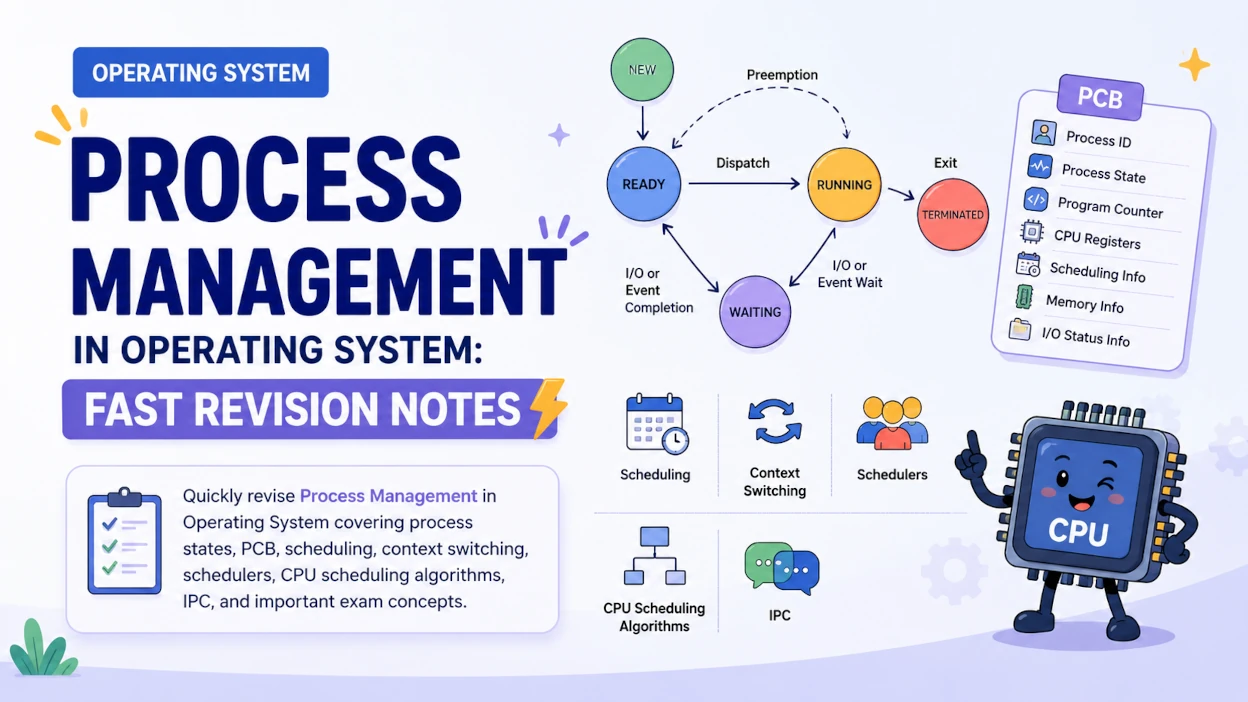
A process is a program in execution. Process Management is one of the most important topics in Operating System because it explains how the OS creates, schedules, and terminates these processes.
For competitive exams such as IBPS SO IT Officer, GATE, NIELIT, UGC NET, and other Computer Science exams, questions are frequently asked from process states, Process Control Block (PCB), scheduling, context switching, schedulers, and CPU scheduling algorithms.
Quick Answer: A process is a program in execution. It moves through five states — New, Ready, Running, Waiting, Terminated — tracked by a data structure called the PCB (Process Control Block). The short-term scheduler picks the next process to run, the dispatcher hands it the CPU, and a context switch happens every time the CPU moves between processes. Common CPU scheduling algorithms are FCFS, SJF, SRTF, Priority, and Round Robin.
This fast revision guide covers the most important concepts you need to remember before an exam.
What is a Process in Operating System?
A process is a program in execution.
A program is a passive entity stored on secondary storage, whereas a process is an active entity that is currently being executed by the CPU.
For example:
Chrome.exe stored on disk → Program
Chrome currently running   → Process
A process requires several resources during execution, including:
- CPU
- Memory
- Registers
- Program counter
- I/O resources
- Files and other system resources
The operating system is responsible for managing these processes efficiently.
Process vs Program
| Program | Process |
|---|---|
| Passive entity | Active entity |
| Stored on secondary storage | Resides in main memory while executing |
| Does not have execution state | Has an execution state |
| Static | Dynamic |
| Example: executable file | Running instance of the executable |
Quick Recall: Remember the simplest definition: Program + Execution = Process.
Process States in Operating System
A process does not continuously remain in the running state. During its lifetime, it moves through different states depending on CPU availability and events such as I/O completion.
The basic five process states are:
| State | Meaning |
|---|---|
| New | Process is being created |
| Ready | Process is waiting for CPU |
| Running | Process is currently executing |
| Waiting / Blocked | Process is waiting for an event or I/O |
| Terminated | Process has finished execution |
1. New
The process is being created.
The operating system allocates the necessary resources and creates the process's data structures.
2. Ready
The process is ready to execute but is waiting for the CPU.
A process in the ready state is generally placed in the ready queue.
3. Running
The process has been selected by the scheduler and is currently executing on the CPU.
On a single-core CPU, normally only one process can be in the running state at a time.
4. Waiting / Blocked
The process cannot continue execution until some event occurs.
For example, it may be waiting for:
- I/O completion
- A file operation
- A signal
- A resource
5. Terminated
The process has completed execution or has been terminated by the operating system.
Process State Transitions
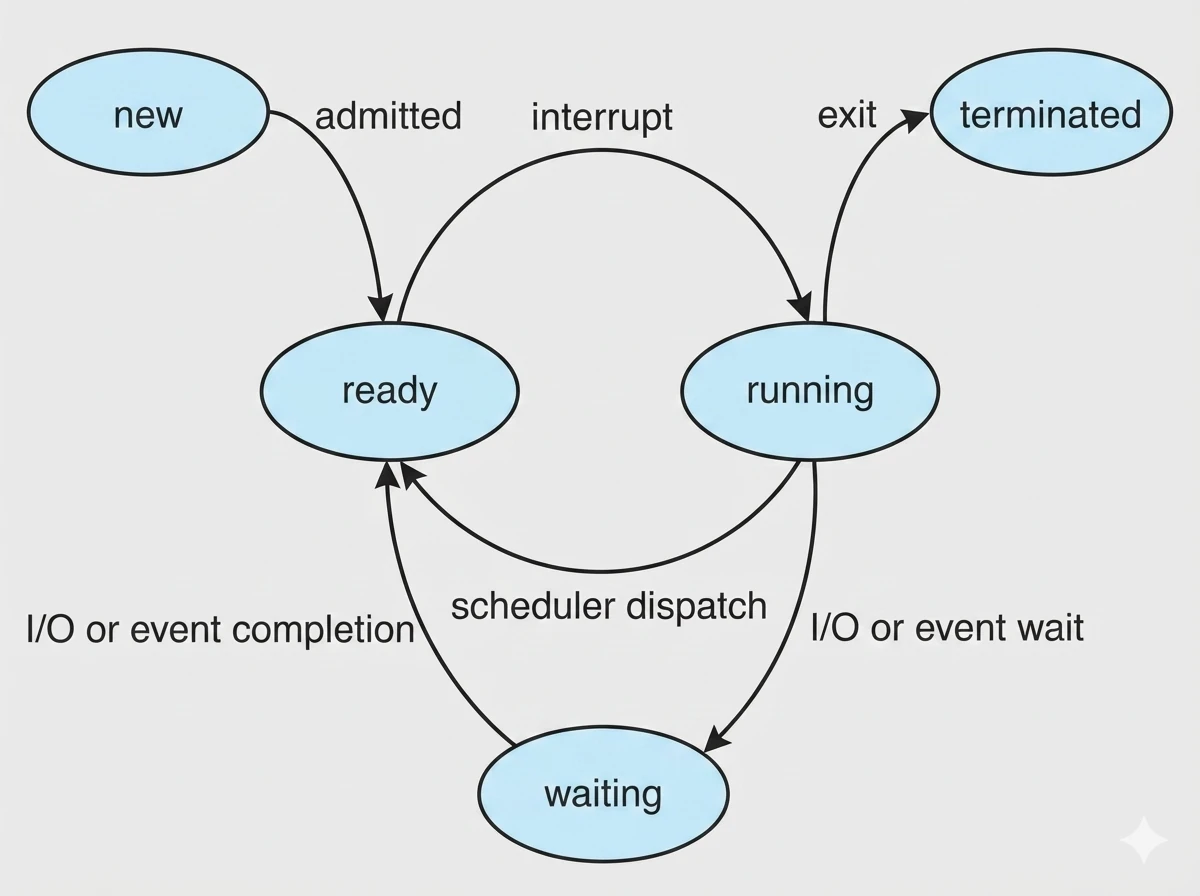
Important transitions:
- New → Ready: Process is admitted for execution.
- Ready → Running: Scheduler selects the process.
- Running → Waiting: Process requests I/O or waits for an event.
- Waiting → Ready: Required event or I/O completes.
- Running → Ready: Process is preempted.
- Running → Terminated: Process finishes execution.
Common Trap: A process waiting for the CPU is Ready, while a process waiting for an I/O operation or event is Waiting/Blocked.
Every one of these transitions is tracked by the OS using a single data structure — the PCB — covered next.
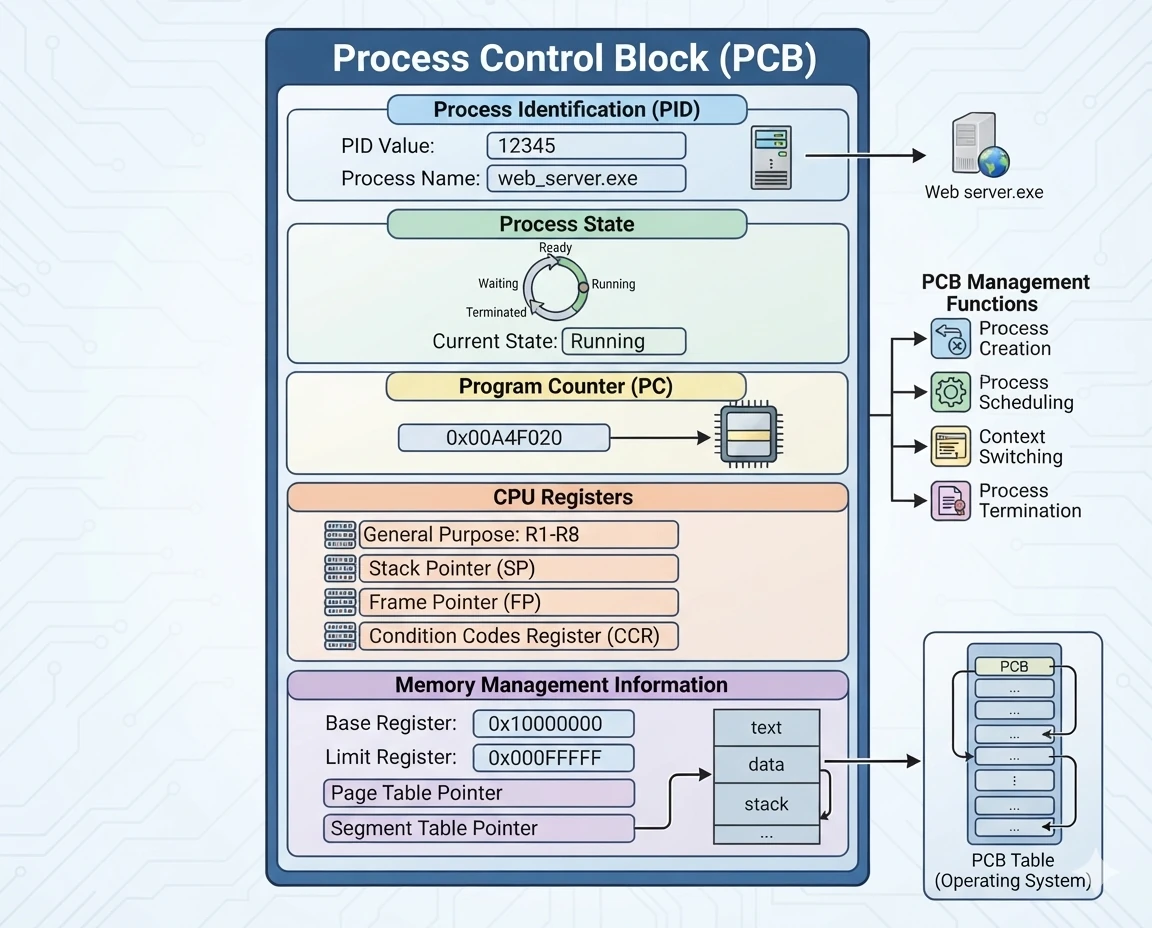
Process Control Block (PCB)
The Process Control Block (PCB) — sometimes called a task control block — is a data structure maintained by the operating system for every process. PCB full form is Process Control Block.
It contains the information required by the OS to manage and resume the process.
Important information stored in a PCB includes:
- Process ID (PID)
- Process state
- Program counter
- CPU registers
- CPU scheduling information
- Memory management information
- Accounting information
- I/O status information
Why is PCB Important?
The OS needs to remember the current state of a process when it stops executing it.
For example:
Process P1 is running
        ↓
Context Switch
        ↓
Save P1 information in PCB
        ↓
Load P2 information
        ↓
Process P2 starts/resumes execution
MCQ Alert: The PCB stores the execution context and management information of a process.
Process Scheduling in Operating System
When multiple processes are ready to execute but only limited CPU resources are available, the OS needs to decide which process should execute next.
This is the job of process scheduling.
The scheduler selects a process from the appropriate queue and allocates CPU time to it.
Scheduling Queues
Processes can be maintained in different queues during their lifetime.
Common queues include:
- Job Queue: Contains processes submitted to the system.
- Ready Queue: Contains processes waiting for CPU allocation.
- Device/Waiting Queue: Contains processes waiting for I/O or other events.
A process may move between these queues during execution.
Types of Process Schedulers
Operating systems commonly use three types of schedulers.
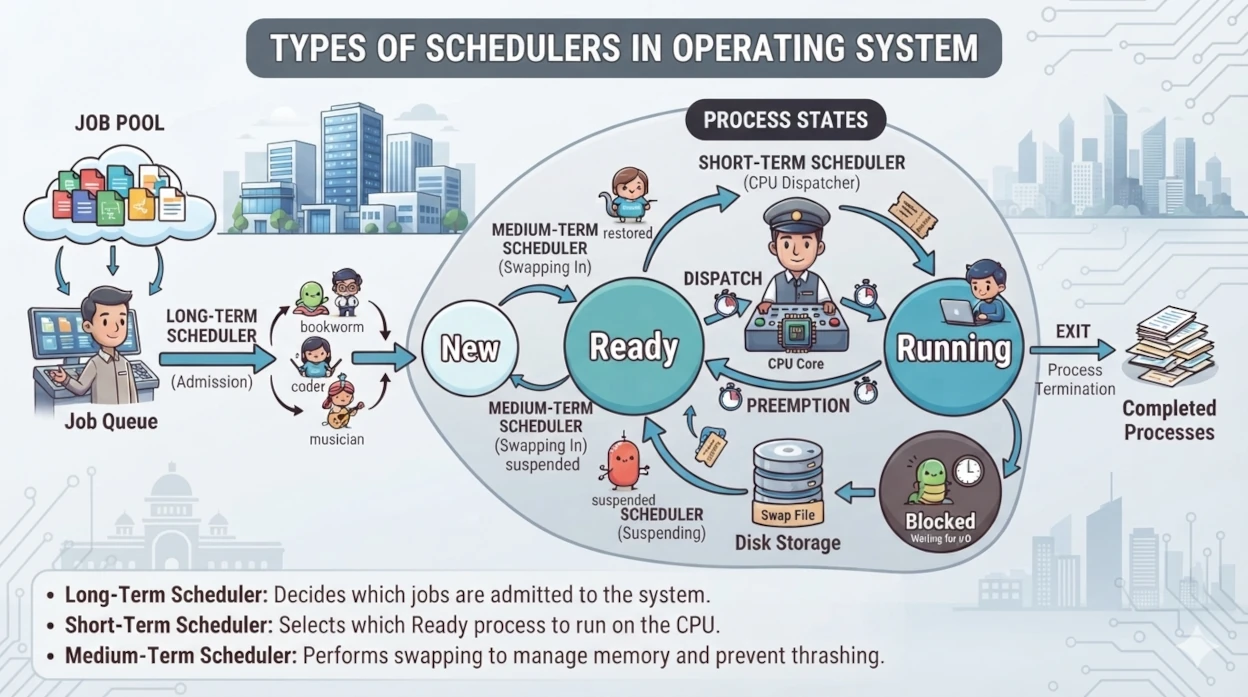
| Scheduler | Main Function | Frequency |
|---|---|---|
| Long-Term Scheduler | Selects processes from the job pool for execution | Less frequent |
| Short-Term Scheduler | Selects the next process for CPU execution | Very frequent |
| Medium-Term Scheduler | Handles process suspension/swapping | Intermediate |
Long-Term Scheduler
The long-term scheduler, also called the job scheduler, selects processes from the job pool and loads them into memory for execution.
It controls the degree of multiprogramming.
Short-Term Scheduler
The short-term scheduler, also called the CPU scheduler, selects one process from the ready queue and allocates the CPU to it.
It runs very frequently, so it must be fast.
Medium-Term Scheduler
The medium-term scheduler can temporarily remove processes from memory and later bring them back.
This is associated with swapping and helps manage memory and the degree of multiprogramming.
Quick Recall: Long-term → Job selection Short-term → CPU selection Medium-term → Swapping/Suspension
Context Switching
A context switch occurs when the CPU switches from one process to another.
The OS saves information about P1 and loads the saved information of P2. The process information required to resume execution is maintained using the PCB.
Context Switch Overhead
Context switching does not directly perform useful application work.
Therefore, excessive context switching can reduce system performance.
Exam Tip: Context switching is an overhead because the CPU spends time saving and restoring process states.
Dispatcher in Operating System
The dispatcher is the OS component that gives control of the CPU to the process selected by the short-term scheduler.
Its responsibilities include:
- Performing context switching
- Switching to user mode
- Jumping to the correct instruction in the selected process
The time the dispatcher takes to stop one process and start another is called dispatch latency — a term worth remembering for MCQs.
The easiest way to remember the difference is:
Scheduler decides who runs. Dispatcher makes it run.
CPU Scheduling Criteria
CPU scheduling algorithms are evaluated using several performance criteria.
CPU Utilization
Percentage of time the CPU remains busy.
Goal: Maximize CPU utilization.
Throughput
Number of processes completed per unit of time.
Goal: Maximize throughput.
Turnaround Time
Total time taken by a process from arrival/submission to completion.
Turnaround Time = Completion Time − Arrival Time
Goal: Minimize turnaround time.
Waiting Time
Total time a process spends waiting in the ready queue.
For the standard CPU scheduling model:
Waiting Time = Turnaround Time − Burst Time
Response Time
Time between submission/arrival of a process and the time it first gets CPU.
Response Time = First CPU Start Time − Arrival Time
Important: Response time is concerned with the first response, whereas turnaround time considers the complete execution.
CPU Scheduling Algorithms
CPU scheduling algorithms determine which ready process should receive the CPU. The most important algorithms for competitive exams are FCFS, SJF, SRTF, Priority Scheduling, and Round Robin.
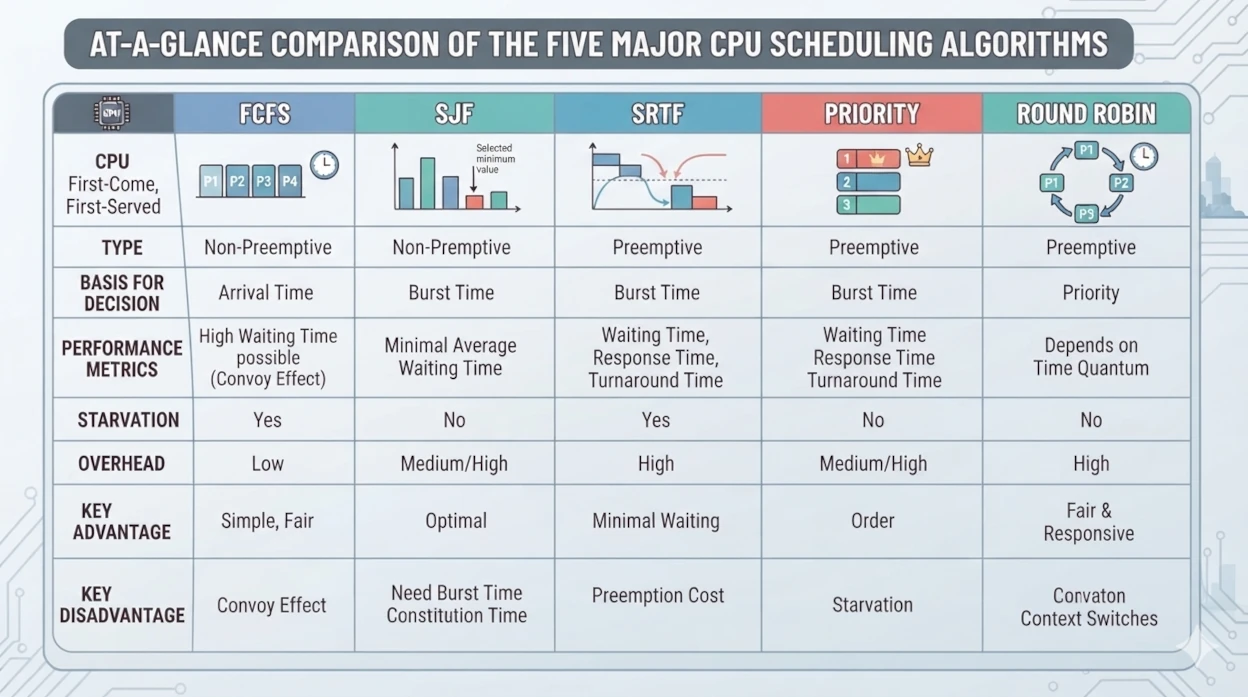
Here's the quick comparison before the detailed breakdown of each:
| Algorithm | Preemptive? | Selection Criterion | Starvation Risk |
|---|---|---|---|
| FCFS | No | Arrival order | Low (but Convoy Effect) |
| SJF | Normally No | Shortest burst time | High for long processes |
| SRTF | Yes | Shortest remaining time | High for long processes |
| Priority | Either | Highest priority | High (solved via Aging) |
| Round Robin | Yes | Time quantum rotation | None |
First Come First Serve (FCFS)
FCFS schedules processes according to their arrival order.
The process that arrives first gets the CPU first.
Characteristics:
- Non-preemptive
- Simple to implement
- Uses FIFO ordering
- Can suffer from the Convoy Effect
Example:
Arrival Order:  P1 → P2 → P3
Execution:      P1 → P2 → P3
Convoy Effect: A long process can make several shorter processes wait behind it.
Common Trap: FCFS is generally a non-preemptive scheduling algorithm.
Shortest Job First (SJF)
SJF selects the process with the shortest CPU burst time.
Example:
P1 = 8 ms   P2 = 3 ms   P3 = 5 ms
Order: P2 → P3 → P1
Characteristics:
- Normally non-preemptive
- Selects the shortest CPU burst
- Can cause starvation of long processes
- Provides minimum average waiting time under ideal assumptions
Shortest Remaining Time First (SRTF)
SRTF is the preemptive version of SJF.
The process having the shortest remaining CPU burst gets the CPU. If a new process arrives with a shorter remaining time than the currently running process, the current process can be preempted.
Quick Recall: SJF → Non-preemptive SRTF → Preemptive
Priority Scheduling
In Priority Scheduling, each process is assigned a priority. The scheduler selects the process with the highest priority according to the system's priority convention.
Priority scheduling can be preemptive or non-preemptive.
Problem — Starvation: A low-priority process may wait indefinitely if higher-priority processes continue arriving.
Solution — Aging: Aging gradually increases the priority of waiting processes to prevent starvation.
MCQ Alert: Aging is used to prevent starvation.
Round Robin Scheduling
Round Robin is a preemptive scheduling algorithm commonly associated with time-sharing systems.
Each process receives a fixed amount of CPU time called the time quantum.
Example:
Time Quantum = 2 ms
P1 → P2 → P3 → P1 → P2 → ...
If a process does not finish within its time quantum, it is preempted and placed back into the ready queue.
Important Point: The choice of time quantum affects performance:
- Very small quantum → excessive context switching
- Very large quantum → behavior approaches FCFS
Exam Tip: Round Robin is based on a time quantum.
Preemptive vs Non-Preemptive Scheduling
| Preemptive | Non-Preemptive |
|---|---|
| Running process can be interrupted | Running process normally keeps CPU until completion/blocking |
| Better responsiveness | Simpler |
| Can result in more context switches | Lower context-switch overhead |
| SRTF, Round Robin | FCFS, SJF |
| Priority Scheduling can also be preemptive | Priority Scheduling can also be non-preemptive |
Important: Priority Scheduling is not inherently preemptive or non-preemptive. Both versions exist.
Process Creation and Termination
The operating system creates processes when new tasks need to execute. Processes can have a parent-child relationship.
In Unix/Linux systems, commonly associated system calls include:
fork()— creates a new processexec()— replaces the current process image with a new programwait()— allows a parent to wait for a childexit()— terminates a process
Parent Process
      │
      ├── Child Process 1
      ├── Child Process 2
      └── Child Process 3
Inter-Process Communication (IPC)
Processes sometimes need to exchange information or coordinate their activities. Inter-Process Communication (IPC) provides mechanisms for processes to communicate.
Two major IPC approaches are shared memory and message passing.
Shared Memory
Processes communicate by accessing a common region of memory. It can be fast because processes communicate through memory, but synchronization may be required when accessing shared data.
Message Passing
Processes communicate by sending and receiving messages. Message passing can be useful when processes do not share the same address space.
Process vs Thread
A process is an independent program in execution, while a thread is a smaller execution unit within a process.
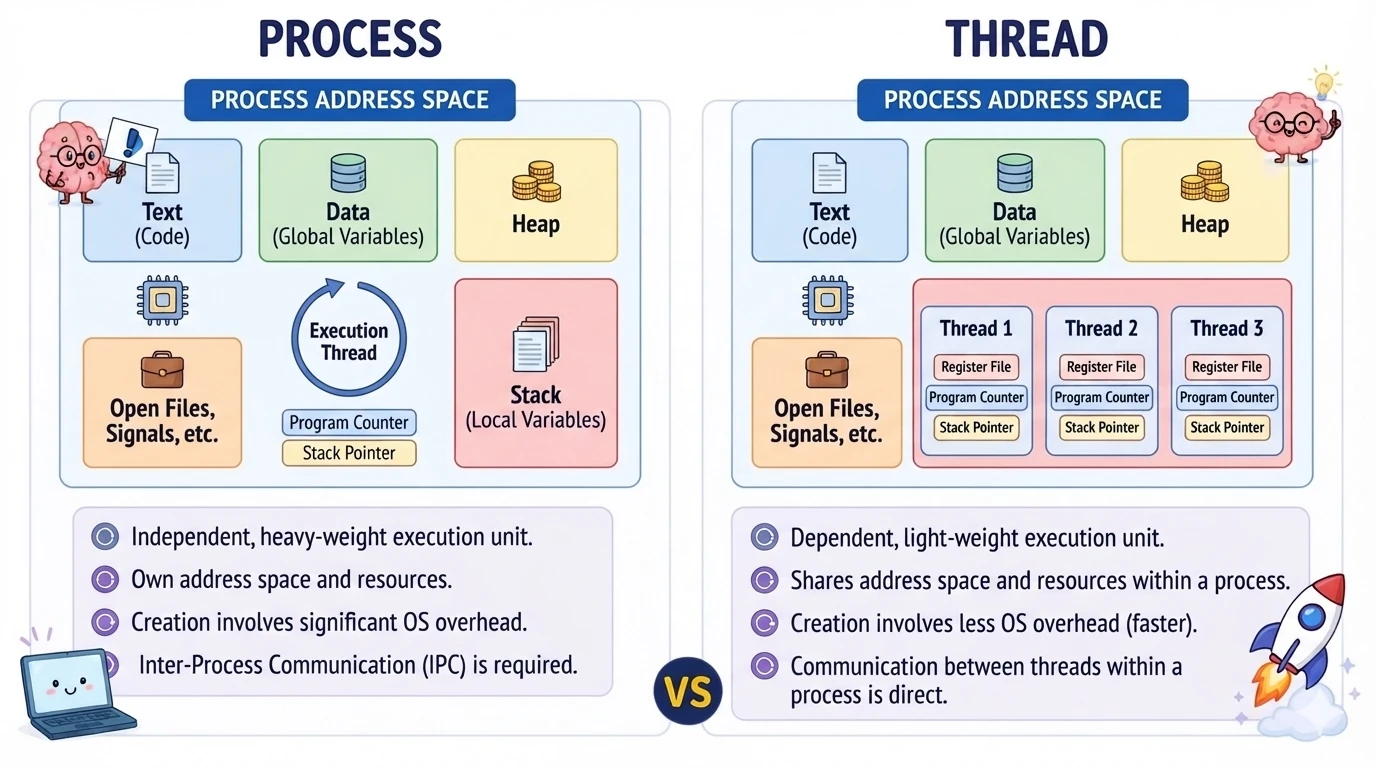
| Process | Thread |
|---|---|
| Has its own address space | Threads of a process share its address space |
| Generally heavier | Generally lighter |
| Process creation is comparatively expensive | Thread creation is comparatively cheaper |
| Provides stronger isolation | Threads have less isolation |
| Communication can require IPC | Threads can communicate through shared process resources |
Exam Tip: Multiple threads belonging to the same process generally share the process's code, data, and other resources, while each thread maintains its own execution state such as registers and stack.
Process Management Quick Revision
Use this table for a last-minute revision:
| Concept | Remember |
|---|---|
| Process | Program in execution |
| New | Process is being created |
| Ready | Waiting for CPU |
| Running | Currently executing |
| Waiting | Waiting for I/O/event |
| Terminated | Execution completed |
| PCB | Stores process information |
| Long-Term Scheduler | Selects jobs/processes for admission |
| Short-Term Scheduler | Selects next CPU process |
| Medium-Term Scheduler | Handles suspension/swapping |
| Dispatcher | Gives CPU to selected process |
| Context Switch | Save current + load next process context |
| FCFS | First arrival gets CPU first |
| SJF | Shortest CPU burst first |
| SRTF | Shortest remaining time first |
| Priority | Highest-priority process selected |
| Aging | Helps prevent starvation |
| Round Robin | Uses time quantum |
| IPC | Communication between processes |
Important Exam Questions
Q1. A process is waiting for the CPU to become available. Which state is it in? A. Ready state.
Q2. Which data structure stores information about a process? A. Process Control Block (PCB).
Q3. Which scheduler selects a process from the ready queue for CPU execution? A. Short-Term Scheduler.
Q4. Which scheduling algorithm uses a time quantum? A. Round Robin.
Q5. Which technique is commonly used to prevent starvation in Priority Scheduling? A. Aging.
Q6. What is the preemptive version of SJF? A. Shortest Remaining Time First (SRTF).
Q7. A process has an arrival time of 2 ms, completion time of 15 ms, and CPU burst time of 8 ms. What is its waiting time?
Turnaround Time = 15 − 2  = 13 ms
Waiting Time     = 13 − 8 = 5 ms
A. 5 ms
Key Takeaways
- A process is a program in execution.
- The main process states are New, Ready, Running, Waiting, and Terminated.
- The PCB stores important information about a process.
- The short-term scheduler selects the next process for CPU execution.
- The dispatcher gives CPU control to the selected process.
- A context switch saves the current process context and loads another process's context.
- FCFS follows arrival order.
- SJF selects the shortest CPU burst.
- SRTF is the preemptive form of SJF.
- Round Robin uses a time quantum.
- Aging helps prevent starvation.
- Turnaround Time = Completion Time − Arrival Time.
- Waiting Time = Turnaround Time − Burst Time.
Related Operating System Fast Revision Articles
Continue your Operating System revision with these related topics:
- Operating System Fast Revision Notes — Complete OS revision roadmap covering the most important concepts.
- CPU Scheduling Algorithms — Practice FCFS, SJF, SRTF, Priority and Round Robin with numerical problems.
- Process Synchronization — Revise critical sections, mutex, semaphores and synchronization problems.
- Threads in Operating System — Understand threads, multithreading and process vs thread.
- Deadlocks in Operating System — Revise deadlock conditions, prevention, avoidance and detection.
- Memory Management in Operating System — Revise paging, segmentation, allocation and related concepts.
- Virtual Memory — Quick revision of demand paging, page faults and page replacement algorithms.
Preparing for IBPS SO IT Officer or another Computer Science competitive exam?
Use MockSensei's free mock tests to practice these concepts under exam-like conditions.