There is a major update for candidates applying for the Coal India Limited (CIL) Management Trainee Recruitment 2026 (Advertisement No. 03/2026). Coal India has officially extended the last date to submit online applications.
Many candidates were facing technical difficulties and confusion while uploading their documents on the portal. To help applicants complete their forms without panic, the management has provided an extension.
In this post, we will share the details of the official date extension notice, look at the document upload requirements, and provide a simple step-by-step guide on how to self-attest your documents correctly so your application does not get rejected.
Coal India MT Recruitment 2026: Important Revised Dates
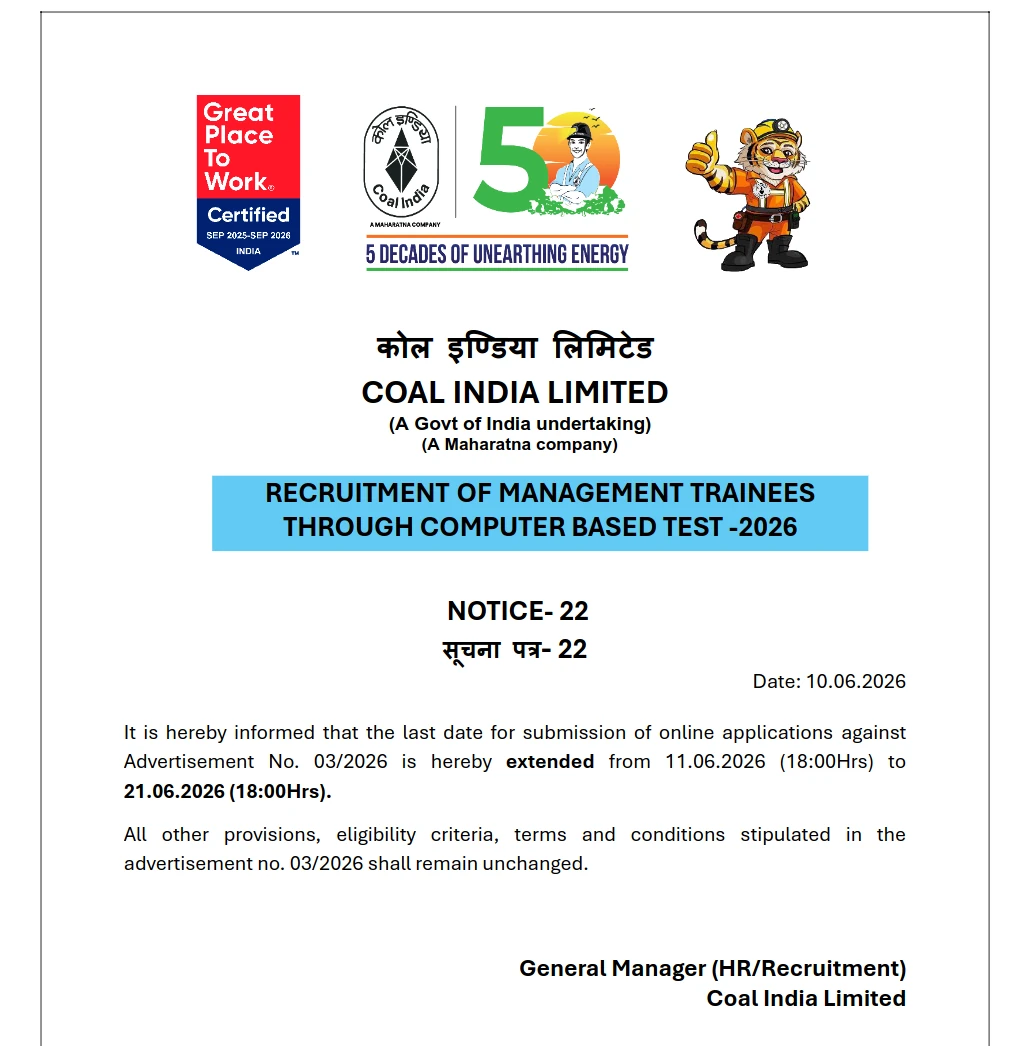
According to the official Notice-22 released by the General Manager (HR/Recruitment) of Coal India Limited on 10th June 2026, the application window has been extended by 10 days.
Here are the revised dates you must note:
| Event | Original Date | Revised Date |
|---|---|---|
| Official Notice Date | — | 10 June 2026 |
| Last Date to Apply Online | 11 June 2026 (18:00 Hrs) | 21 June 2026 (18:00 Hrs) |
| Exam Date (CBT) | To be announced | To be announced |
Please Note: All other terms, eligibility criteria, and conditions mentioned in the original advertisement (No. 03/2026) remain exactly the same.
Below is the official notice copy for your reference:
Why Was the Last Date Extended?
While the official notice does not state a specific reason, many applicants reported having trouble with the document upload section on the CIL registration portal.
The application process requires candidates to upload several academic and personal documents. Crucially, all uploaded documents must be self-attested first, scanned, and then uploaded. Many students were confused about the correct way to self-attest their certificates or faced errors when merging semester marksheets into single PDF files.
If you are facing similar issues, this extra time is a good opportunity to prepare and upload your files correctly.
Which Documents Do You Need to Upload?
When you log into the Coal India application portal, you will see a list of documents that must be uploaded. Some of these are mandatory (marked with a red asterisk *), while others depend on your qualification level.
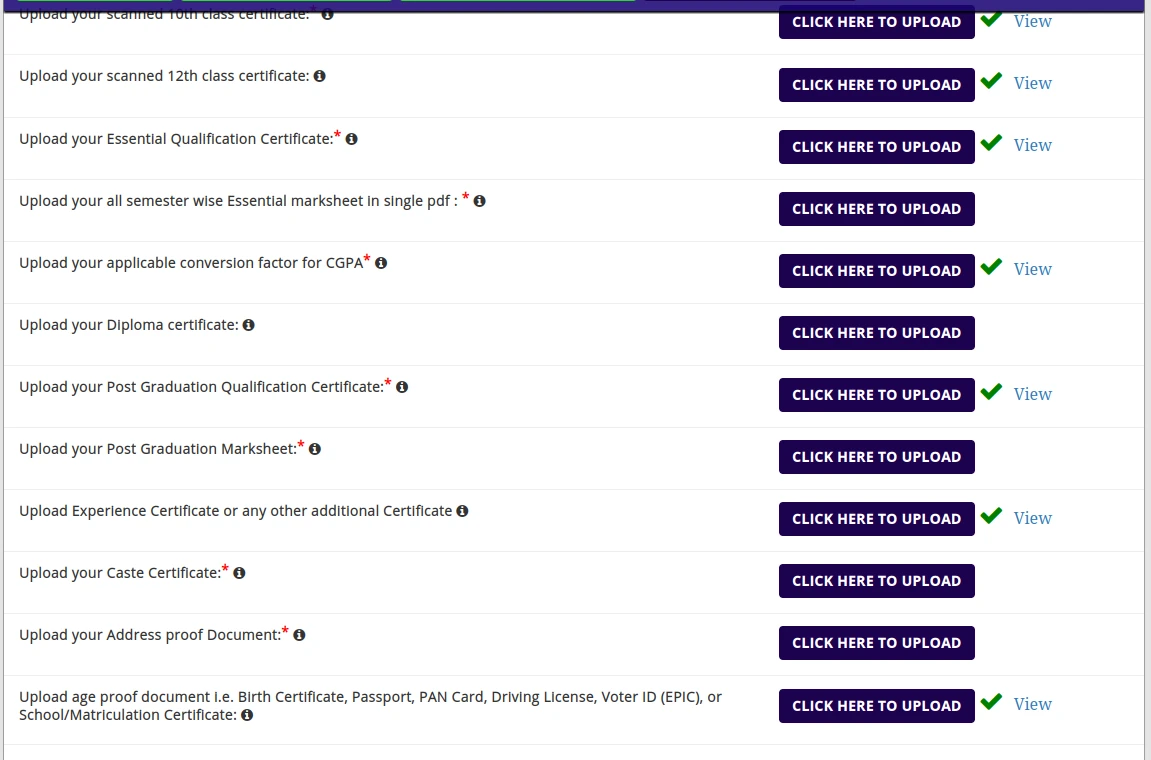
Here is the checklist of documents you should keep ready:
- Class 10th Certificate (acts as proof of date of birth)
- Class 12th Certificate
- Essential Qualification Certificate (Degree/Provisional Certificate)*
- Semester-wise Marksheets (All semesters combined into a single PDF)*
- CGPA to Percentage Conversion Formula (if your university awards CGPA)*
- Diploma Certificate (if applicable)
- Post Graduation Degree & Marksheet (if applicable)*
- Caste/Category Certificate (OBC-NCL, SC, ST, EWS - if applicable)*
- Address Proof Document (Aadhaar Card, Voter ID, etc.)*
- Age Proof Document (Birth Certificate, Passport, PAN Card, Driving License, or Matriculation Certificate)
How to Self-Attest Your Documents Correctly
Self-attestation is a simple process, but doing it incorrectly can lead to the rejection of your application form.
Important Rule: Do NOT write or sign directly on your original certificates.
Steps to Self-Attest:
- Take a clear photocopy (Xerox copy) of your original document (e.g., your 10th marksheet or degree certificate).
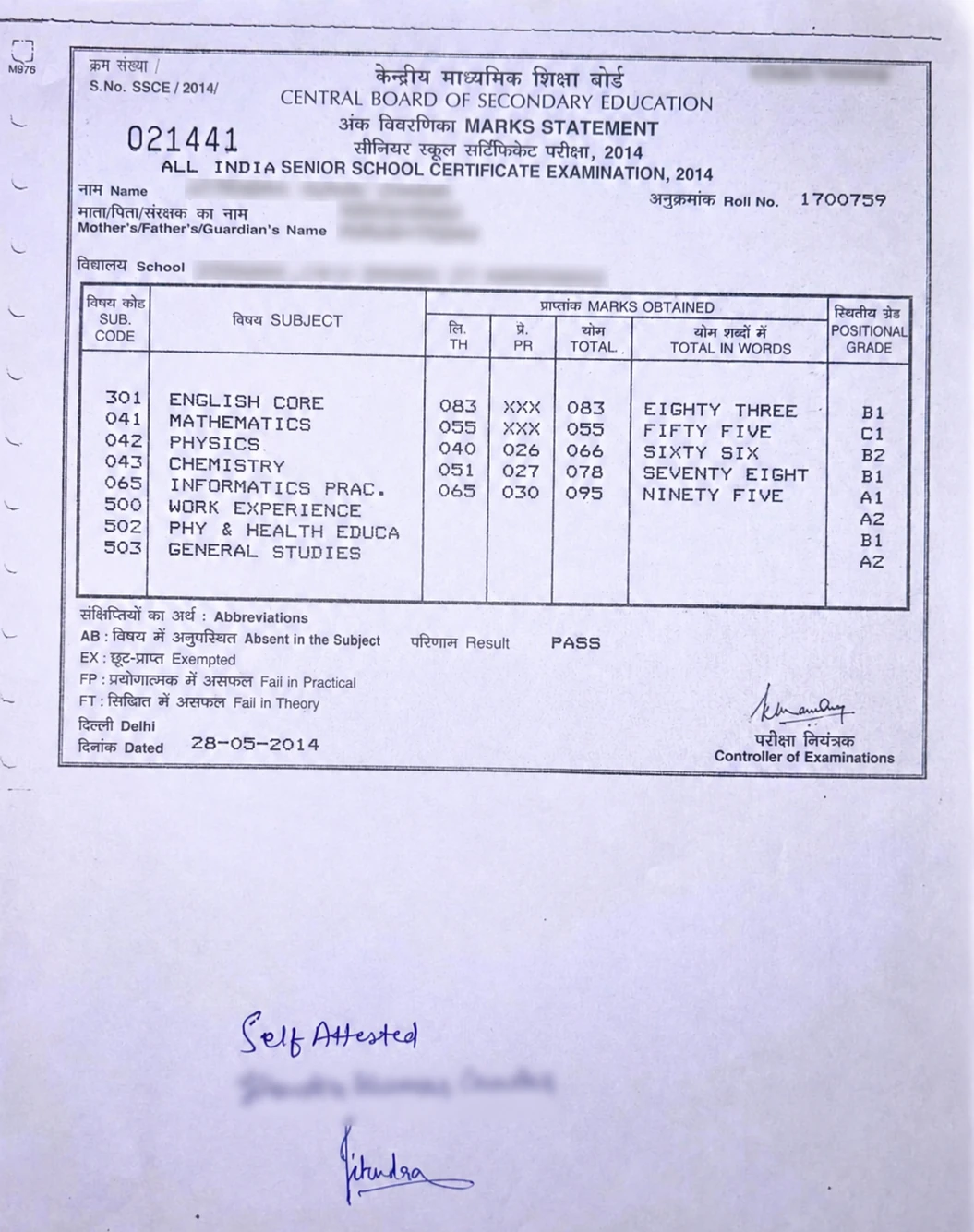
- On a blank space at the bottom of the photocopy, clearly write "Self Attested" by hand.
- Put your signature directly below the "Self Attested" text.
- Write your full name below your signature (exactly as it appears on your certificates).
- (Optional but recommended) Write the current date next to your signature.
- Scan this signed photocopy using a mobile scanner app or a flatbed scanner. Save it in the required file format (usually PDF or JPEG as specified by the portal).
Reference Sample of a Self-Attested Document:
To make this clear, here is an example of a self-attested marksheet. You can see how the text and signature are placed at the bottom without blocking any important information:
Practical Tips for Uploading Documents
- Combining Marksheets: For the "all semester marksheets" field, you must combine all your marksheets into one continuous PDF file. You can use free online tools like IlovePDF or Smallpdf to merge them, but make sure each page is self-attested before you merge them.
- File Size Limits: Keep an eye on the file size limit mentioned on the portal. If your merged PDF is too large, use a PDF compressor tool to reduce its size without losing readability.
- CGPA Conversion: If your college marksheets use CGPA or CPI, check your university guidelines and obtain the official conversion formula document. Self-attest this formula sheet and upload it in the designated section.
Practice What You Just Learned
Go to the Official Coal India Website to Complete Your Application
Do not wait until the final evening of 21st June 2026 to upload your files. Server traffic can get heavy close to the deadline. Take your time today, double-check your self-attested files, and complete your application smoothly.