Transactions in DBMS: Fast Revision Notes for IBPS SO IT Officer
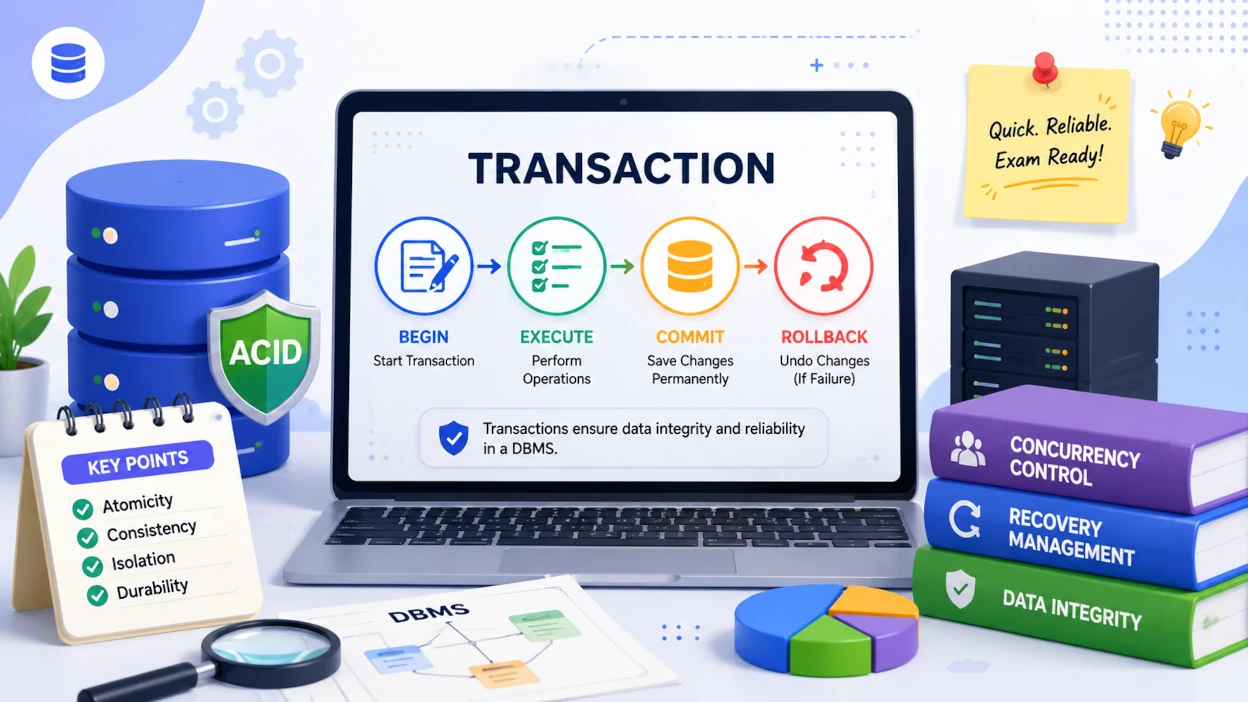
A transaction in DBMS is a sequence of one or more database operations executed as a single logical unit of work, which either completes entirely or leaves the database unchanged. IBPS SO IT Officer and similar exams test this topic through conceptual questions on transaction states, COMMIT, ROLLBACK, and SAVEPOINT — rarely through pure definitions — so understanding the state transitions matters more than memorizing terms.
Questions on transaction states, COMMIT vs ROLLBACK, and SAVEPOINT are asked far more often than theoretical definitions. Master the state diagram below first.
What Is a Transaction?
A transaction is considered successful only when every operation inside it completes; if even one operation fails, the database rolls back to its previous consistent state.
A transaction typically groups operations like:
INSERTUPDATEDELETESELECT(in some cases, for read consistency)
Example: Fund Transfer
Rahul transfers ₹5,000 from Account A to Account B. The transaction has two operations:
- Debit ₹5,000 from Account A (₹50,000 → ₹45,000)
- Credit ₹5,000 to Account B (₹20,000 → ₹25,000)
Q: What happens if the debit succeeds but the credit operation fails? A: The DBMS rolls back the debit operation as well, since a transaction must be all-or-nothing — Account A's balance is restored to ₹50,000 so the database never ends up in an inconsistent, partially-updated state.
Why Transactions Are Needed
Without transactions, a partial update caused by any of the following could leave the database inconsistent:
| Cause | Risk Without Transactions |
|---|---|
| Power failure | Update stops midway, data left inconsistent |
| System crash | Partially written changes corrupt records |
| Concurrent access | Two users overwrite each other's changes |
| Constraint violation | Invalid data gets partially inserted |
Transaction Lifecycle and States
Every transaction moves through six possible states — Active, Partially Committed, Committed, Failed, Aborted, and Terminated — depending on whether it completes successfully or encounters an error.
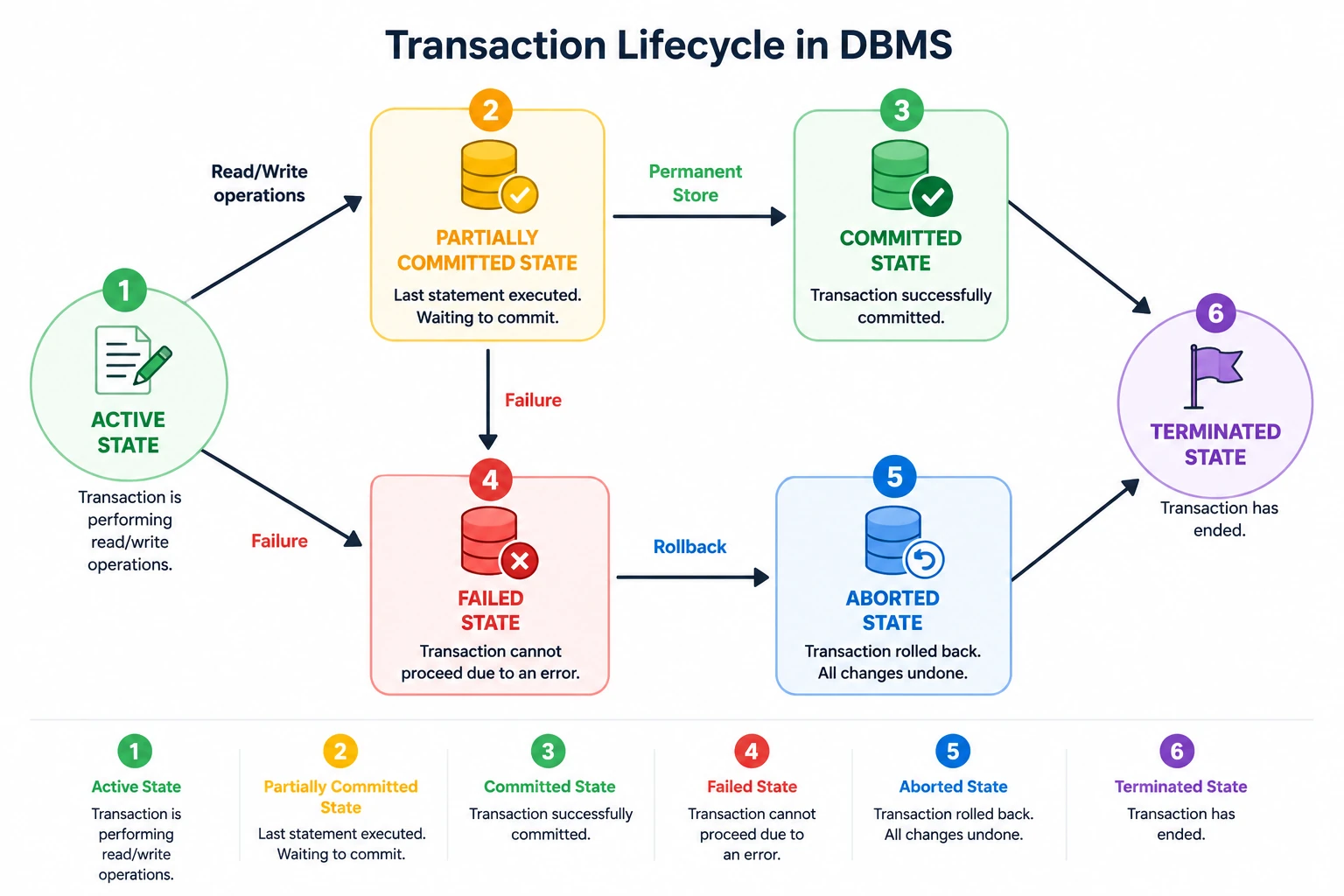
Success path: Active → Partially Committed → Committed → Terminated Failure path: Active → Failed → Aborted → Terminated (or restarted)
| State | What's Happening |
|---|---|
| Active | SQL statements are currently executing; the transaction is in progress |
| Partially Committed | The last statement has executed, but changes aren't yet permanent |
| Committed | All changes are permanently saved to disk; cannot be undone |
| Failed | An error occurred (constraint violation, deadlock, crash) before completion |
| Aborted | The DBMS has rolled back all changes made by the failed transaction |
| Terminated | Final state — reached after either a successful COMMIT or a successful ROLLBACK |
Q: Which transaction state occurs immediately after the last SQL statement executes, before COMMIT? A: Partially Committed. The statement has run, but the DBMS hasn't yet guaranteed the changes are permanently written to disk — that guarantee only comes after COMMIT succeeds.
Q: What is the difference between the Failed and Aborted states? A: Failed is the state entered the moment an error occurs (e.g., a constraint violation or deadlock), before any recovery happens. Aborted is the state entered after the DBMS has rolled back all the transaction's changes in response to that failure.
Q: Can a transaction resume after entering the Aborted state? A: A transaction cannot resume itself, but the DBMS or application may choose to restart it as a brand-new transaction; the original aborted transaction still ends in the Terminated state.
Transaction Control Commands (TCL)
COMMIT, ROLLBACK, SAVEPOINT, and ROLLBACK TO SAVEPOINT are the four Transaction Control Language (TCL) commands used to manage transaction outcomes, with COMMIT and ROLLBACK the most frequently tested.
COMMIT
COMMIT permanently saves all changes made during the current transaction, after which the changes become visible to other users and can no longer be undone.
START TRANSACTION;

UPDATE Employee
SET Salary = Salary + 5000
WHERE EmpID = 101;

COMMIT;
ROLLBACK
ROLLBACK cancels a transaction and restores the database to its state before the transaction began, but only for changes that have not yet been committed.
START TRANSACTION;

DELETE FROM Employee
WHERE EmpID = 101;

ROLLBACK;
The deleted record is restored, because the DELETE was never committed.
SAVEPOINT and ROLLBACK TO SAVEPOINT
A SAVEPOINT marks an intermediate checkpoint inside a transaction, letting you undo only the operations after that checkpoint instead of the entire transaction.
START TRANSACTION;

UPDATE Employee
SET Salary = Salary + 5000
WHERE EmpID = 101;

SAVEPOINT S1;

DELETE FROM Employee
WHERE EmpID = 102;

ROLLBACK TO S1;

COMMIT;
Result: the salary update is preserved, the delete is undone, and the transaction is committed successfully — this partial-rollback behavior is exactly what SAVEPOINT is tested on.
TCL Commands Summary
| Command | Purpose |
|---|---|
| COMMIT | Permanently saves all changes |
| ROLLBACK | Undoes all uncommitted changes |
| SAVEPOINT | Creates an intermediate checkpoint |
| ROLLBACK TO SAVEPOINT | Undoes only changes made after a specific savepoint |
Q: Can ROLLBACK undo a transaction that has already been committed? A: No. Once COMMIT has executed successfully, the changes are permanent and ROLLBACK has no effect on them — ROLLBACK can only undo uncommitted work.
Autocommit Mode
Autocommit is a DBMS setting that, when ON, treats every individual SQL statement as its own transaction and commits it automatically right after execution.
| Autocommit State | Behavior |
|---|---|
| ON | Each statement is its own transaction; auto-committed immediately |
| OFF | Multiple statements can be grouped; saved only when COMMIT runs manually |
In competitive exams, assume transactions are executed manually (Autocommit OFF) unless the question explicitly says otherwise.
Transactions vs ACID Properties
Transactions define how database operations are grouped and executed, while ACID properties — Atomicity, Consistency, Isolation, and Durability — define the rules that make those transactions reliable.
| Transactions | ACID Properties |
|---|---|
| Logical unit of work | Guarantees that make transactions trustworthy |
| Managed using TCL commands | Includes Atomicity, Consistency, Isolation, Durability |
| Contains the actual SQL operations | Defines correctness rules the operations must satisfy |
👉 Continue your revision with ACID Properties in DBMS — the two topics are frequently tested together in IBPS SO IT Officer.
One-Minute Revision
| Concept | Remember |
|---|---|
| Transaction | Logical unit of work — all or nothing |
| COMMIT | Permanently saves changes |
| ROLLBACK | Undoes uncommitted changes |
| SAVEPOINT | Checkpoint for partial rollback |
| Success path | Active → Partially Committed → Committed → Terminated |
| Failure path | Active → Failed → Aborted → Terminated |
| Committed transactions | Cannot be rolled back |
| Autocommit ON (exam default: assume OFF) | Each statement auto-commits individually |
🎯 Revision Checklist
Tick the concepts you're confident about before attempting the mock test.
What to Study Next
Complete your DBMS revision with these related articles.
| Topic | Status |
|---|---|
| SQL Commands | ✅ Available |
| SQL Constraints | ✅ Available |
| SQL Joins | ✅ Available |
| SQL Keys | ✅ Available |
| Normalization | ✅ Available |
| ACID Properties | ✅ Available |
Practice Transactions in DBMS
Test your understanding of transaction states, COMMIT, ROLLBACK, SAVEPOINT, and other DBMS concepts with exam-level questions.