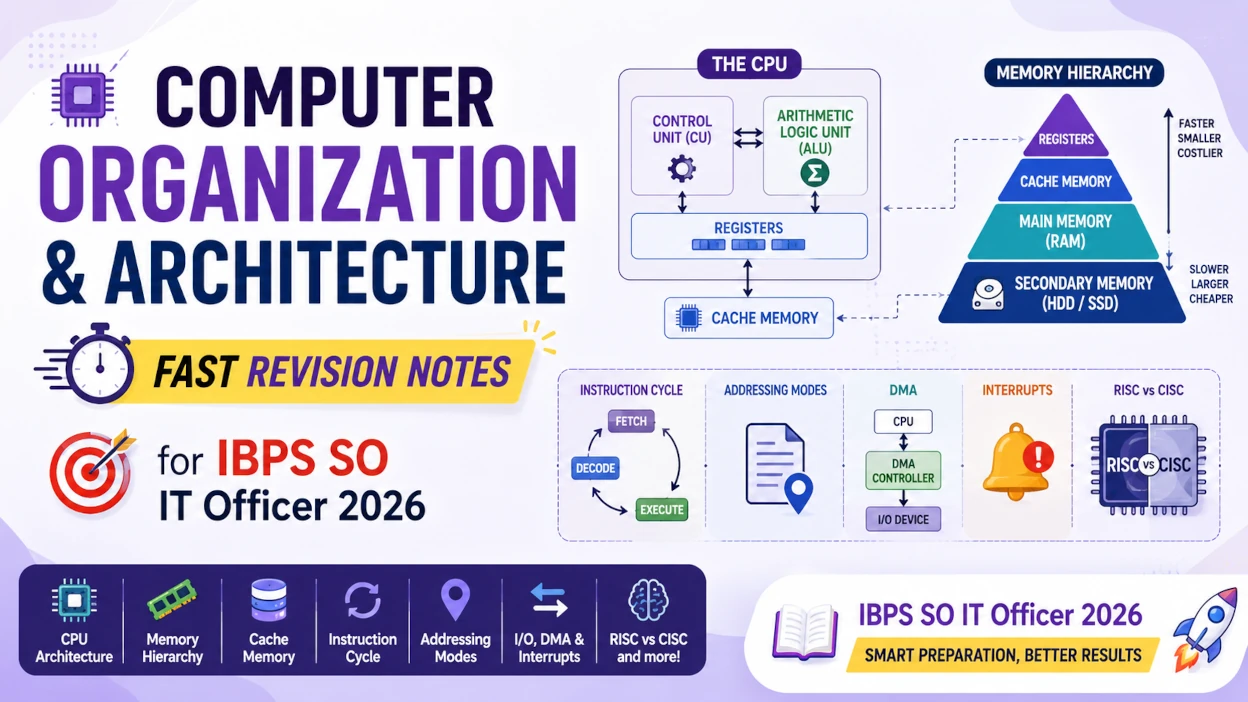
Computer Organization & Architecture for IBPS SO IT Officer 2026
Computer Architecture defines what a computer does, as seen by a programmer, while Computer Organization explains how the hardware is actually built and connected to make that happen. Computer Organization & Architecture (COA) is a core subject in IBPS SO IT Officer, NIELIT, GATE, and technical interviews, and it is tested almost entirely through conceptual comparisons — Organization vs Architecture, ALU vs Control Unit, RISC vs CISC, DMA vs Interrupt — rather than numerical problems.
⏱️ Revision Time: 12–15 minutes 🎯 Exam Focus: IBPS SO IT Officer • NIELIT • GATE • Technical Interviews
This guide is a single-page revision hub: concise notes, comparison tables, and a priority order for what to study first, followed by topic-wise and full-length mock tests.
Topic Priority for Revision
Previous year papers show a consistent pattern in which COA topics get tested most. Use this single table to sequence your revision.
| Topic | Exam Weightage | Revise |
|---|---|---|
| Organization vs Architecture | ⭐⭐⭐⭐⭐ | First |
| Memory Hierarchy | ⭐⭐⭐⭐⭐ | First |
| Cache Memory | ⭐⭐⭐⭐⭐ | First |
| Von Neumann vs Harvard Architecture | ⭐⭐⭐⭐☆ | First |
| CPU Organization (ALU, CU, Registers) | ⭐⭐⭐⭐☆ | First |
| Instruction Cycle | ⭐⭐⭐⭐☆ | Second |
| Addressing Modes | ⭐⭐⭐⭐☆ | Second |
| RISC vs CISC | ⭐⭐⭐⭐☆ | Second |
| Interrupts & Polling | ⭐⭐⭐☆☆ | Third |
| DMA | ⭐⭐⭐☆☆ | Third |
| Pipelining & Flynn's Classification | ⭐⭐☆☆☆ | Third |
Fast Memory Trick: Architecture = WHAT the computer does · Organization = HOW it does it · Registers = fastest memory · Cache = SRAM · RAM = DRAM
Start Your Computer Organization & Architecture Revision
Revise the topics above, then reinforce them with subject-wise free mock tests built for the IBPS SO IT Officer exam.
1. Computer Organization vs Computer Architecture
Computer Architecture is the functional specification of a computer as seen by a programmer — its instruction set, addressing modes, and registers — while Computer Organization is how the hardware is actually implemented to deliver that specification.
| Computer Organization | Computer Architecture |
|---|---|
| Explains how the hardware works | Explains what the computer does |
| Hardware implementation, data paths, control signals | Instruction Set Architecture (ISA), addressing modes, data types |
| The internal, hidden view | The programmer's visible view |
| Concerned with execution | Concerned with design and specification |
Q: What is the difference between Computer Organization and Computer Architecture? A: Computer Architecture defines what the computer does — its instruction set and the features visible to a programmer — while Computer Organization defines how the hardware actually implements those features, including data paths, control signals, and processor design.
Quick Revision
- Architecture = WHAT (programmer's view, ISA, registers, addressing modes).
- Organization = HOW (hardware implementation, control signals, data paths).
- This is one of the most frequently asked conceptual questions in the exam.
2. Basic Functional Units of a Computer
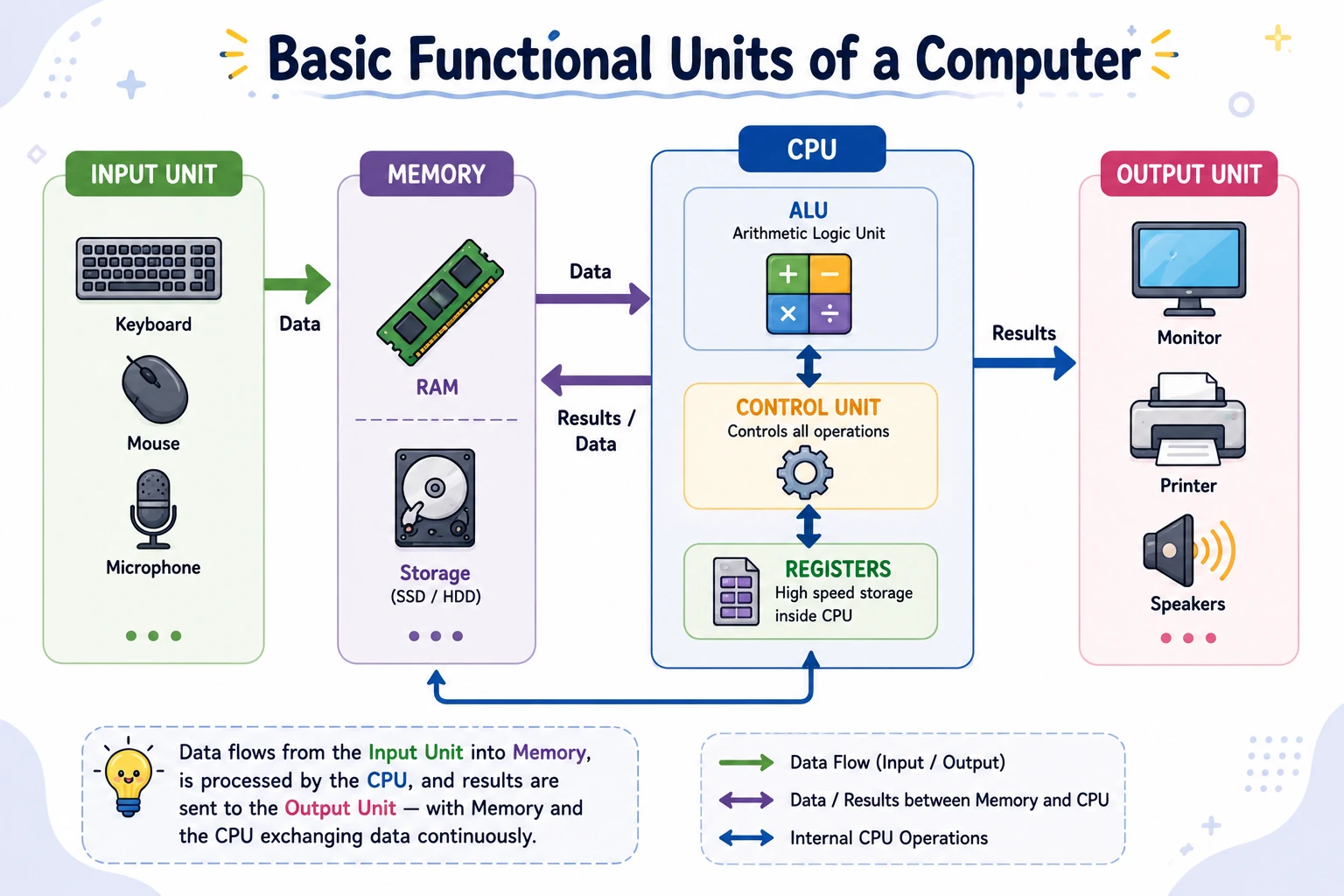
Every computer is built from four basic functional units — Input, Memory, Central Processing Unit, and Output — that work together to accept, process, store, and return data.
| Unit | Role |
|---|---|
| Input Unit | Converts data from devices (keyboard, mouse, scanner) into machine-readable form |
| Memory Unit | Stores instructions, programs, intermediate results, and final output |
| CPU | Processes data and controls instruction execution — contains the ALU, Control Unit, and Registers |
| Output Unit | Converts processed data back into a human-readable or usable form |
Quick Revision
- Four units: Input → Memory ⇄ CPU → Output.
- CPU is called the "brain" of the computer because it processes data and controls execution.
- Memory can be Primary (fast, temporary) or Secondary (slower, permanent) — covered in the Memory Hierarchy section below.
3. Von Neumann Architecture
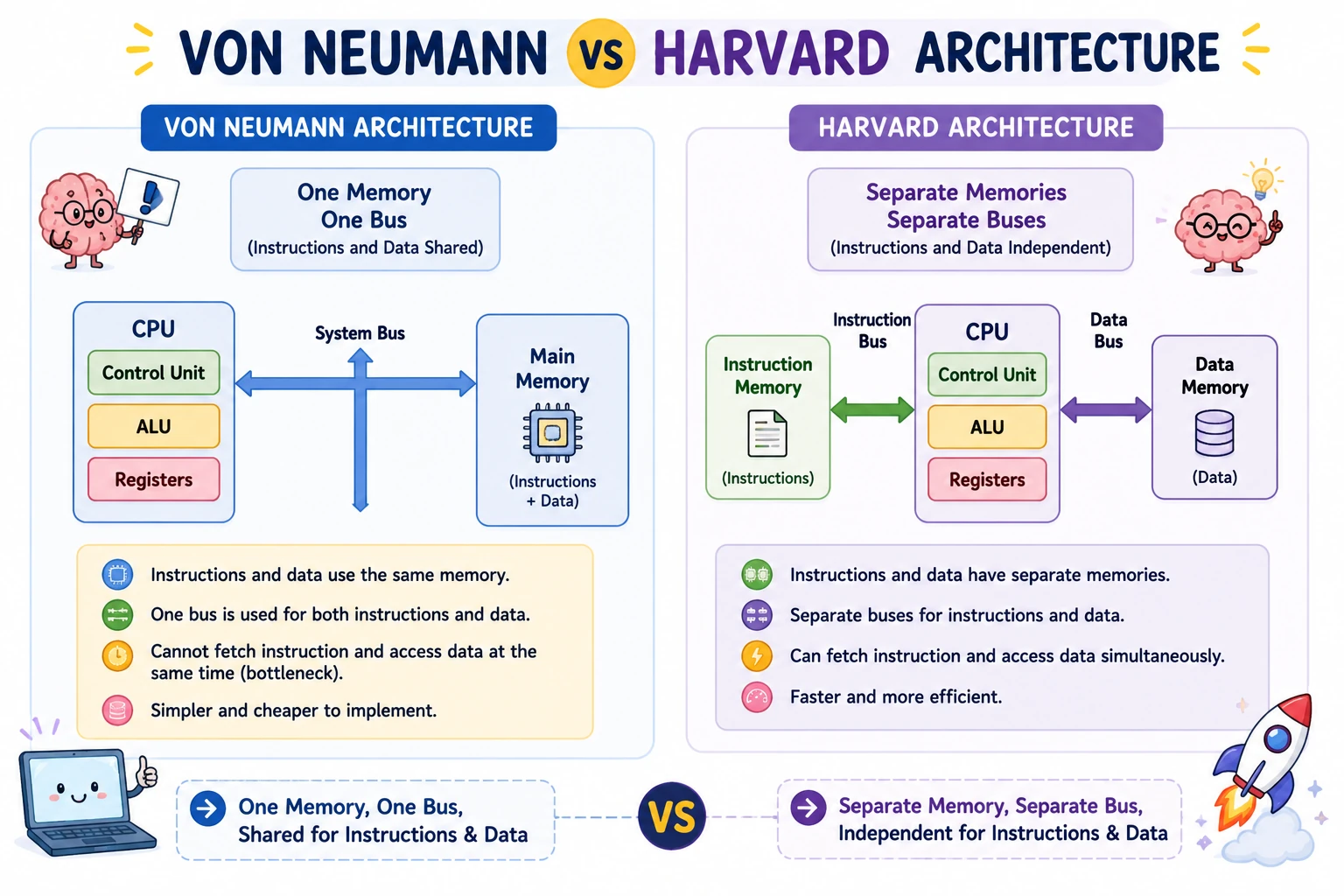
Von Neumann Architecture is a computer design in which both instructions and data are stored in the same memory and travel over the same bus, based on the "stored-program concept" where a program's instructions are treated as data that can be loaded, read, and modified in memory.
Almost every general-purpose computer today — including the CPU in your laptop — is based on this design. Its key ideas are:
- Programs and data live in the same memory.
- Instructions are fetched and data is accessed using the same bus.
- Instructions can be treated as data (this is what allows a computer to load and run different programs).
The Von Neumann Bottleneck
Because instructions and data share a single bus, the CPU cannot fetch an instruction and read/write data at the exact same time — it must wait its turn. This shared-bus limitation on speed is called the Von Neumann Bottleneck, and it is one of the key reasons Cache Memory (covered later in this guide) is so important for modern performance.
Von Neumann vs Harvard Architecture
| Feature | Von Neumann Architecture | Harvard Architecture |
|---|---|---|
| Memory for Instructions & Data | Shared — a single memory unit | Separate — two independent memory units |
| Bus | Single shared bus for both | Separate buses for instructions and data |
| Speed | Slower — limited by the Von Neumann Bottleneck | Faster — instructions and data can be accessed simultaneously |
| Design Complexity | Simpler, cheaper to build | More complex, costlier to build |
| Common Use | General-purpose computers (PCs, laptops) | Microcontrollers, DSPs, and embedded systems |
Q: What is the Von Neumann Bottleneck? A: The Von Neumann Bottleneck is the performance limitation caused by instructions and data sharing a single memory and a single bus, which forces the CPU to access them one at a time rather than simultaneously — this is a key reason cache memory is so important for improving CPU performance.
Q: What is the main difference between Von Neumann and Harvard Architecture? A: In Von Neumann Architecture, instructions and data share the same memory and the same bus, which is simpler but creates a speed bottleneck. In Harvard Architecture, instructions and data have separate memories and separate buses, allowing simultaneous access and faster performance, at the cost of more complex hardware.
Quick Revision
- Von Neumann = one shared memory + one shared bus for instructions and data.
- Its core idea is the stored-program concept — instructions are stored and treated like data.
- The shared bus causes the Von Neumann Bottleneck — a frequently tested keyword.
- Harvard Architecture uses separate memories/buses and is common in embedded systems and microcontrollers.
4. CPU Organization: ALU, Control Unit & Registers
The CPU is made up of three components — the Arithmetic Logic Unit (ALU), which performs calculations; the Control Unit (CU), which directs execution; and Registers, which provide the fastest temporary storage — working together to execute every instruction.
| Component | Role |
|---|---|
| ALU | Performs arithmetic operations (add, subtract, multiply, divide) and logical operations (AND, OR, NOT, XOR) |
| Control Unit | Fetches and decodes instructions, generates control signals, and coordinates memory and I/O — does not perform calculations |
| Registers | Fastest storage inside the CPU; temporarily hold instructions, addresses, and operands during execution |
Q: What is the difference between the ALU and the Control Unit? A: The ALU performs the actual arithmetic and logical calculations required by an instruction, while the Control Unit does not perform any calculations itself — it fetches instructions, decodes them, and generates the control signals that coordinate the rest of the hardware.
Important Registers
| Register | Purpose |
|---|---|
| Program Counter (PC) | Stores the address of the next instruction to execute |
| Instruction Register (IR) | Stores the current instruction being executed |
| Memory Address Register (MAR) | Stores the memory address being accessed |
| Memory Data Register (MDR) | Stores the data being read from or written to memory |
| Accumulator | Stores intermediate results of arithmetic operations |
Quick Revision
- ALU → calculates; Control Unit → controls (no calculations).
- Registers are the fastest memory in a computer, faster than Cache.
- PC holds the address of the next instruction; IR holds the current instruction — a frequently tested pair.
5. Instruction Cycle
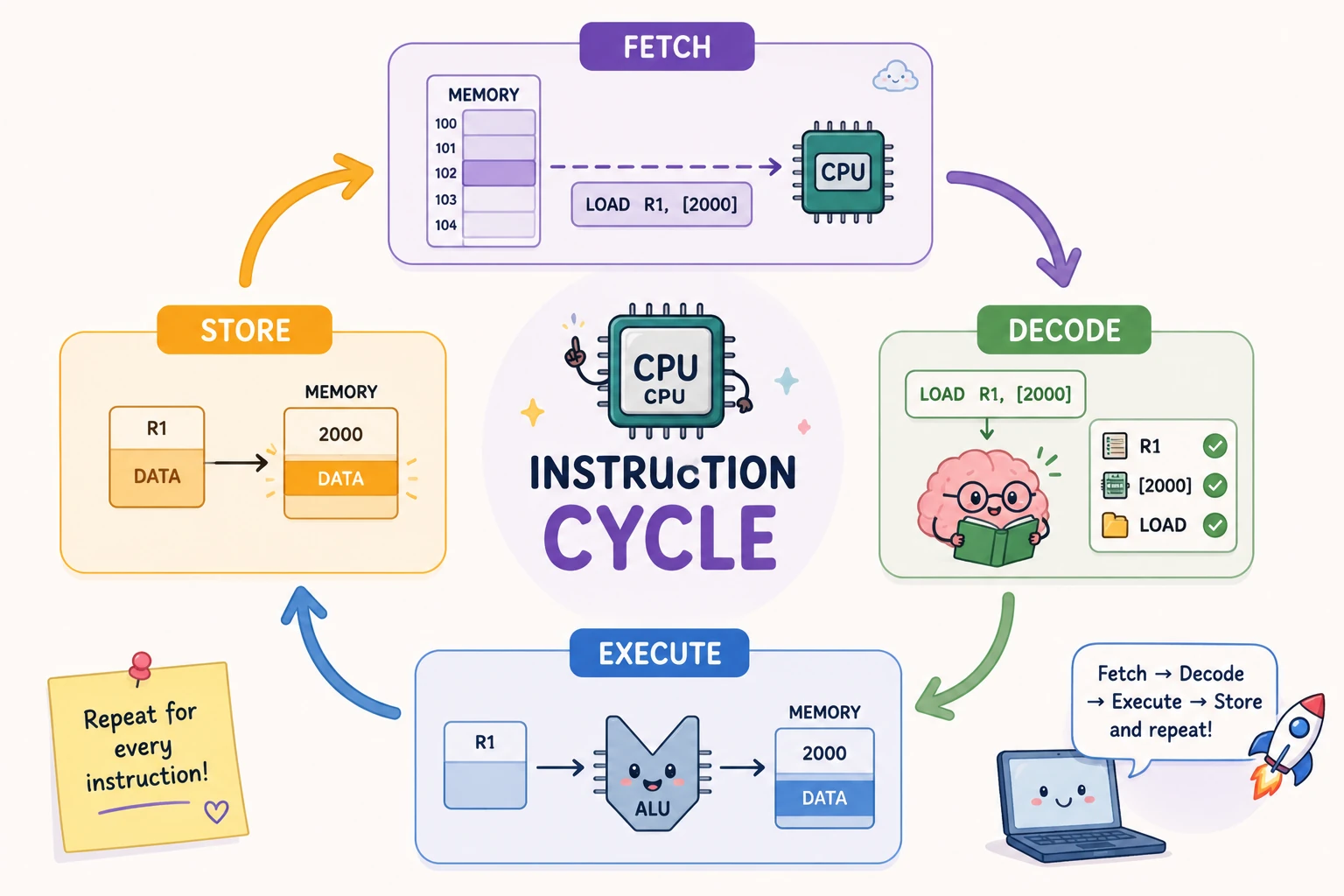
The Instruction Cycle is the repeating sequence of four stages — Fetch, Decode, Execute, and Store — that the CPU performs to process every single instruction stored in memory.
| Stage | What Happens |
|---|---|
| Fetch | The CPU reads the next instruction from memory, using the address in the PC, and loads it into the IR |
| Decode | The Control Unit interprets the instruction — which operation, which operands, which hardware units are needed |
| Execute | The required operation is performed, mostly by the ALU (arithmetic, logic, data transfer, or I/O) |
| Store | The result is written back to a register, main memory, or an output device; the cycle then repeats |
Q: What is the difference between the Program Counter and the Instruction Register? A: The Program Counter (PC) stores the address of the next instruction to be fetched, while the Instruction Register (IR) stores the actual current instruction that is being decoded and executed.
Quick Revision
- Instruction Cycle order: Fetch → Decode → Execute → Store (FDES).
- PC → address of next instruction. IR → current instruction itself.
- Most arithmetic/logic work in the Execute stage happens in the ALU.
6. Addressing Modes
An Addressing Mode specifies how the CPU locates the operand — the actual data — that an instruction needs to work with.
| Addressing Mode | How the Operand Is Located | Example | Memory Accesses |
|---|---|---|---|
| Immediate | The operand is part of the instruction itself | ADD 5 | 0 |
| Register | The operand is stored inside a CPU register | ADD R1 | 0 |
| Direct | The instruction contains the actual memory address of the operand | LOAD 1000 | 1 |
| Register Indirect | A register holds the memory address of the operand | LOAD (R1) | 1 |
| Indirect | The instruction points to a memory location that itself contains the operand's address | LOAD @1000 | 2 or more |
| Indexed | Effective Address = Index Register + Offset, used mainly for arrays | Array[5] | 1 |
Q: Which addressing modes are fastest, and why? A: Immediate and Register Addressing are the fastest, because neither requires a separate memory access — the operand is either inside the instruction itself or already inside a CPU register, both of which are far faster to reach than main memory.
Quick Revision
- Immediate & Register → fastest, no memory access needed.
- Direct → one memory access; Indirect → multiple memory accesses (slowest).
- Indexed Addressing → used for accessing array elements.
7. Interrupts
An Interrupt is a signal that temporarily pauses the CPU's current execution so it can immediately respond to an important event, resuming the original program afterward.
Flow: Program Running → Interrupt Occurs → CPU Saves Current State → Interrupt Service Routine (ISR) Executes → State Restored → Program Resumes.
Types of Interrupts
| Type | Generated By | Example |
|---|---|---|
| Hardware Interrupt | An external device | Keyboard key press, disk controller, printer |
| Software Interrupt | A program instruction, intentionally | System calls, OS service requests |
| Internal Interrupt (Exception) | The CPU itself, due to an error | Divide by zero, arithmetic overflow, invalid instruction |
Why Interrupts Are Needed: Polling vs Interrupt
Interrupts exist because Polling — where the CPU repeatedly checks a device's status in a loop — wastes CPU cycles; an interrupt instead lets the device notify the CPU only when it actually needs attention.
| Polling | Interrupt |
|---|---|
| CPU continuously checks device status | Device notifies the CPU only when needed |
| Wastes CPU cycles | Efficient CPU utilization |
| Slower overall response | Faster response to events |
| Simpler to implement | More efficient, slightly more complex implementation |
Q: What is the difference between Polling and Interrupts? A: In Polling, the CPU repeatedly checks each device's status in a loop, wasting CPU cycles even when no device needs attention. In Interrupts, the device itself signals the CPU only when service is actually required, making CPU usage far more efficient.
Quick Revision
- Interrupt = pause → service (ISR) → resume.
- Three types: Hardware (external device), Software (program-triggered), Internal/Exception (CPU error).
- Polling wastes cycles; Interrupts are efficient — a frequently tested comparison.
8. Direct Memory Access (DMA)
Direct Memory Access (DMA) allows an I/O device to transfer data directly to main memory without continuous CPU involvement, freeing the CPU to do other work during large data transfers.
DMA transfer steps: CPU configures the DMA Controller → DMA Controller takes control of the system bus → Data transfers directly between the I/O device and memory → DMA Controller sends an interrupt to the CPU once the transfer is complete.
Common uses: hard disks, SSDs, network cards, graphics cards, audio devices — anywhere large amounts of data move in and out of memory.
Q: What is the difference between DMA and an Interrupt for data transfer? A: With DMA, a dedicated DMA Controller transfers data directly between an I/O device and memory with minimal CPU involvement, making it suitable for large, bulk transfers. With interrupt-driven transfer, the CPU itself must handle moving the data, which is fine for small or occasional transfers but wastes CPU time on large ones.
Quick Revision
- DMA = device talks directly to memory, not through the CPU for each byte.
- CPU only initiates the transfer and gets an interrupt when it's done.
- DMA → best for bulk transfers; CPU-handled interrupt transfer → best for small, occasional transfers.
9. Memory Hierarchy
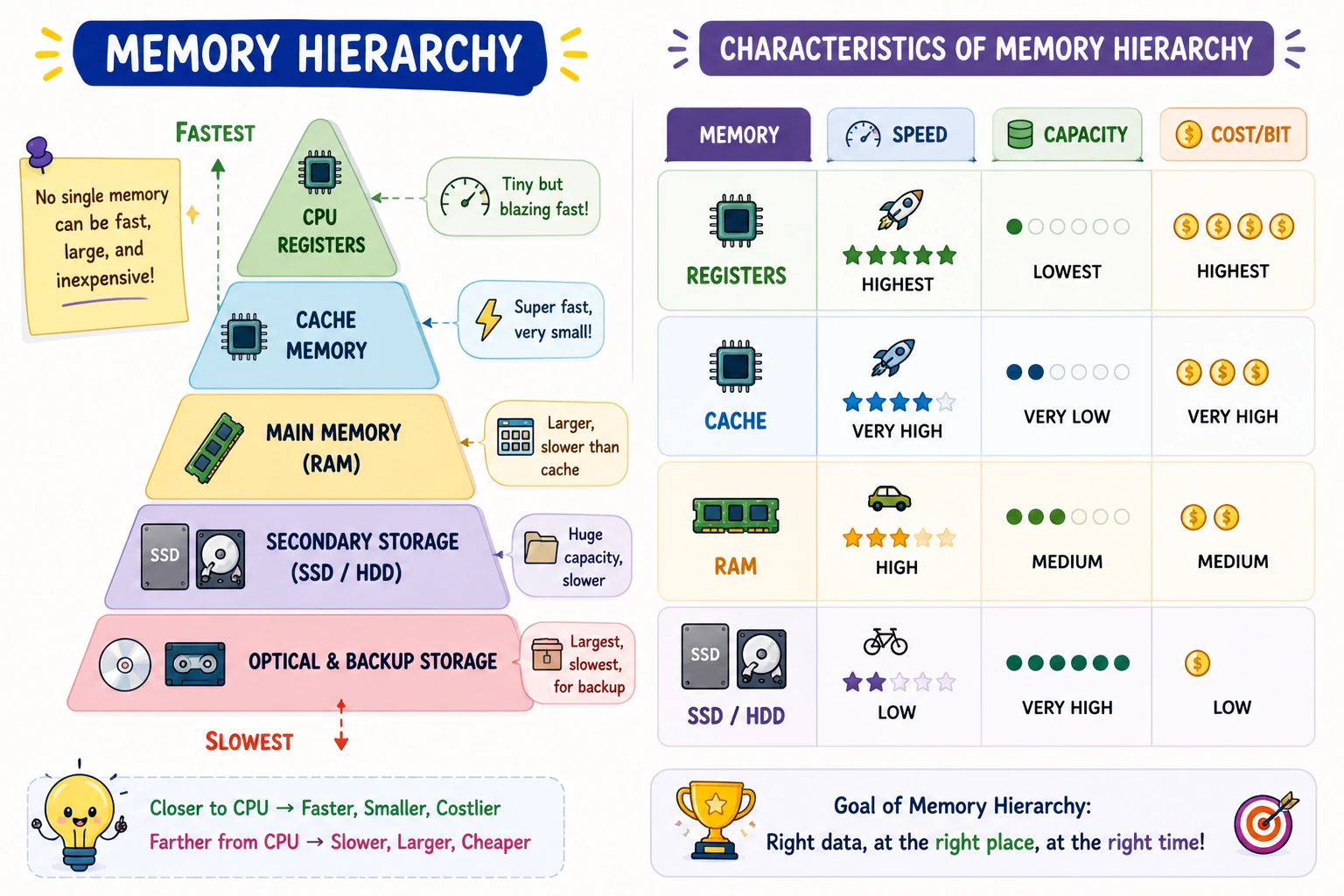
Memory Hierarchy arranges the different types of computer memory by speed, cost, and capacity, because no single memory technology can be fast, large, and cheap at the same time.
| Memory Level | Speed | Capacity | Cost per Bit |
|---|---|---|---|
| Registers | Highest | Lowest | Highest |
| Cache Memory | Very High | Very Low | Very High |
| Main Memory (RAM) | High | Medium | Medium |
| Secondary Storage (SSD/HDD) | Low | Very High | Low |
| Optical & Backup Storage | Lowest | Highest | Lowest |
Q: What is the general rule relating speed, cost, and capacity across the memory hierarchy? A: As you move down the memory hierarchy — from Registers to Cache to RAM to Secondary Storage — capacity increases and cost per bit decreases, but speed also decreases; there is a direct trade-off between how fast a memory is and how much of it you can affordably have.
Quick Revision
- Order (fastest to slowest): Registers → Cache → RAM → SSD/HDD → Optical/Backup.
- Higher in the hierarchy = faster but smaller; lower = slower but larger.
10. Cache Memory
Cache Memory is a small, high-speed memory placed between the CPU and Main Memory to reduce the average time it takes the CPU to access data.
The CPU checks the cache before going to RAM. If the data is found in the cache, access is much faster than fetching it from RAM.
| Cache Level | Location | Speed |
|---|---|---|
| L1 Cache | Inside the CPU core | Fastest |
| L2 Cache | Inside the CPU (larger, shared per core) | Faster |
| L3 Cache | Shared across all CPU cores | Fast |
Access order: CPU → L1 Cache → L2 Cache → L3 Cache → RAM.
Cache Hit vs Cache Miss
| Term | Meaning | Result |
|---|---|---|
| Cache Hit | The requested data is found in the cache | Fast access, no RAM access needed |
| Cache Miss | The requested data is not found in the cache | CPU must fetch from RAM, higher access time |
Q: Why is cache memory faster than RAM? A: Cache memory is faster than RAM because it is much smaller, physically located closer to the CPU, and built using SRAM (Static RAM), which is faster — though more expensive per bit — than the DRAM (Dynamic RAM) technology used in main memory.
Cache vs Virtual Memory
Cache Memory is a hardware concept that speeds up the CPU, while Virtual Memory is an Operating System concept that increases the amount of usable memory by borrowing space from secondary storage.
| Cache Memory | Virtual Memory |
|---|---|
| Hardware concept | Operating System concept |
| Improves CPU speed | Increases available memory capacity |
| Located near the CPU, uses SRAM | Uses secondary storage (SSD/HDD) |
| Transparent to the user | Managed by the operating system |
Q: What is the difference between Cache Memory and Virtual Memory? A: Cache Memory is a hardware component that speeds up the CPU by storing frequently accessed data close to it using fast SRAM. Virtual Memory is an operating system technique that lets programs larger than the available RAM run, by temporarily moving inactive data to secondary storage.
Quick Revision
- Cache → SRAM, faster, near CPU, improves speed.
- RAM → DRAM, main memory.
- Virtual Memory → OS-managed, uses disk to extend usable capacity, not speed.
- Cache Hit = fast; Cache Miss = falls back to RAM.
11. RISC vs CISC
RISC (Reduced Instruction Set Computer) processors use a small set of simple, fixed-length instructions, while CISC (Complex Instruction Set Computer) processors support a larger set of complex, variable-length instructions.
| Feature | RISC | CISC |
|---|---|---|
| Instruction Complexity | Simple instructions | Complex instructions |
| Instruction Length | Fixed | Variable |
| Number of Registers | More registers | Fewer registers |
| Pipelining | Easier to pipeline | More complex to pipeline |
| Examples | ARM, RISC-V, MIPS | Intel x86, AMD x86-64 |
Q: What is the difference between RISC and CISC? A: RISC processors use a small set of simple instructions with fixed length, which makes pipelining easier and execution faster for simple operations. CISC processors support a larger set of complex instructions with variable length, reducing the number of instructions per program but making decoding and pipelining more complex.
Exam questions usually test the characteristics of RISC and CISC (instruction length, complexity, pipelining), not just the processor examples — don't memorize examples alone.
Quick Revision
- RISC → simple, fixed-length instructions, easier pipelining (ARM, RISC-V).
- CISC → complex, variable-length instructions, harder pipelining (Intel x86).
12. Pipelining & Flynn's Classification
Instruction Pipelining is a technique that improves CPU throughput by overlapping the Fetch, Decode, Execute, and Store stages of multiple instructions at the same time, instead of finishing one instruction completely before starting the next.
Pipeline Hazards
| Hazard | Cause |
|---|---|
| Structural Hazard | Two instructions need the same hardware resource at once |
| Data Hazard | One instruction depends on the result of another that hasn't finished |
| Control Hazard | Caused by branch or jump instructions changing the expected instruction flow |
Flynn's Classification groups computer architectures by the number of instruction streams and data streams they can process at once:
| Type | Full Form | Typical Use |
|---|---|---|
| SISD | Single Instruction, Single Data | Traditional single-processor computers |
| SIMD | Single Instruction, Multiple Data | Vector processors, GPUs |
| MISD | Multiple Instructions, Single Data | Rarely used in practice |
| MIMD | Multiple Instructions, Multiple Data | Modern multicore processors |
Q: Which Flynn's Classification type describes modern multicore processors? A: MIMD (Multiple Instruction, Multiple Data) describes modern multicore processors, since each core can execute different instructions on different data simultaneously.
Quick Revision
- Pipelining overlaps instruction stages for higher throughput; watch for Structural, Data, and Control hazards.
- Flynn's Classification, by instruction/data streams: SISD → SIMD → MISD → MIMD.
- MIMD = modern multicore CPUs; SIMD = GPUs and vector processors.
Quick Revision Cheat Sheet
One final scan before your mock test.
| Concept | Remember |
|---|---|
| Architecture | WHAT the computer does (programmer's view) |
| Organization | HOW the computer works (hardware implementation) |
| ALU | Performs arithmetic & logic (calculates) |
| Control Unit | Controls execution, no calculations |
| Fastest memory | Registers |
| Von Neumann Architecture | Shared memory + bus for instructions and data |
| Von Neumann Bottleneck | Speed limit caused by that shared bus |
| Instruction cycle order | Fetch → Decode → Execute → Store |
| PC vs IR | PC = next instruction's address; IR = current instruction |
| Fastest addressing modes | Immediate & Register (no memory access) |
| Cache technology | SRAM (faster, smaller, costlier) |
| RAM technology | DRAM |
| Cache vs Virtual Memory | Cache = speed (hardware); Virtual Memory = capacity (OS) |
| Polling vs Interrupt | Polling wastes cycles; Interrupt is efficient |
| DMA | Device transfers data directly to memory, minimal CPU involvement |
| RISC | Simple, fixed-length instructions |
| CISC | Complex, variable-length instructions |
| MIMD | Multiple instructions, multiple data — modern multicore CPUs |
Frequently Asked Questions
What is the difference between Computer Organization and Computer Architecture? Computer Architecture defines what the computer does, while Computer Organization explains how the hardware implements those architectural features.
What are the basic functional units of a computer? The basic functional units are Input Unit, Memory Unit, CPU (ALU, Control Unit and Registers), and Output Unit.
What is the instruction cycle? The instruction cycle consists of Fetch, Decode, Execute and Store phases.
What is the difference between RISC and CISC? RISC uses simple instructions with fixed instruction length, whereas CISC supports complex instructions with variable instruction lengths.
Why is cache memory faster than RAM? Cache memory is smaller, located closer to the CPU, and built using faster SRAM technology.
What is DMA? Direct Memory Access allows I/O devices to transfer data directly to main memory without continuous CPU involvement.
What are interrupts? Interrupts temporarily stop the CPU's current execution so it can respond to important hardware or software events.
What is the difference between a Cache Hit and a Cache Miss? A Cache Hit occurs when the data the CPU needs is already found in the cache, allowing fast access. A Cache Miss occurs when the data is not in the cache, forcing the CPU to fetch it from the slower main memory.
What is the difference between Cache Memory and Virtual Memory? Cache Memory is a hardware concept that speeds up the CPU using SRAM close to it. Virtual Memory is an operating system concept that uses secondary storage to let programs larger than RAM run.
What is Von Neumann Architecture? Von Neumann Architecture is a computer design in which instructions and data are stored in the same memory and share the same bus, based on the stored-program concept. It is used in most general-purpose computers, but its shared bus causes a speed limitation known as the Von Neumann Bottleneck.
What is the difference between Von Neumann and Harvard Architecture? Von Neumann Architecture uses a single shared memory and bus for both instructions and data, while Harvard Architecture uses separate memories and buses for each, allowing simultaneous access and generally faster performance at the cost of more complex hardware.
Which Computer Organization & Architecture topics are most important for IBPS SO IT Officer? Memory Hierarchy, Cache Memory, CPU Organization, Von Neumann Architecture, Instruction Cycle, Addressing Modes, RISC vs CISC, DMA, Interrupts, and Computer Organization vs Architecture are frequently tested.
🎯 Revision Checklist
Tick the concepts you're confident about before attempting the mock test.
What to Study Next
Continue your Computer Science revision with these related guides.
| Topic | Status |
|---|---|
| Operating Systems | ✅ Available |
| Computer Networks | ✅ Available |
| Transactions in DBMS | ✅ Available |
| ACID Properties in DBMS | ✅ Available |
| OOPs Concepts in Java | ✅ Available |
| Data Structures & Algorithms | ✅ Available |
| Software Engineering & SDLC | ✅ Available |
Practice Topic-wise Mock Tests
Revise one topic at a time, then reinforce it immediately with a matching test.
Ready for the Complete Computer Organization and Architecture Mock Test?
Ready to Test Your IT Professional Knowledge?
Access subject-wise free mock tests for every IT domain topic — Computer Organization & Architecture, Networks, OS, DBMS, Software Engineering, and DSA — with detailed explanations and AI-powered question generation.
Final Thoughts
Computer Organization & Architecture rewards clear comparisons over memorization: keep Organization (HOW) and Architecture (WHAT) straight, know your memory hierarchy from Registers down to secondary storage, and be able to separate RISC from CISC and DMA from interrupt-driven transfer without hesitation. Work through this guide top to bottom once, then validate your recall with MockSensei's topic-wise tests before attempting a full-length Professional Knowledge mock.
Enjoyed this revision guide?
We share daily formula cheat sheets, practice questions, and upcoming exam notifications in our broadcast channels.